





New graphic solutions for sports from Orad in Broadcast
Orad está mostrando en la feria Broadcast la solución MAM deportiva PowerPlay y el flujo de trabajo sin cintas con su servidor PlayMaker de slow motion.
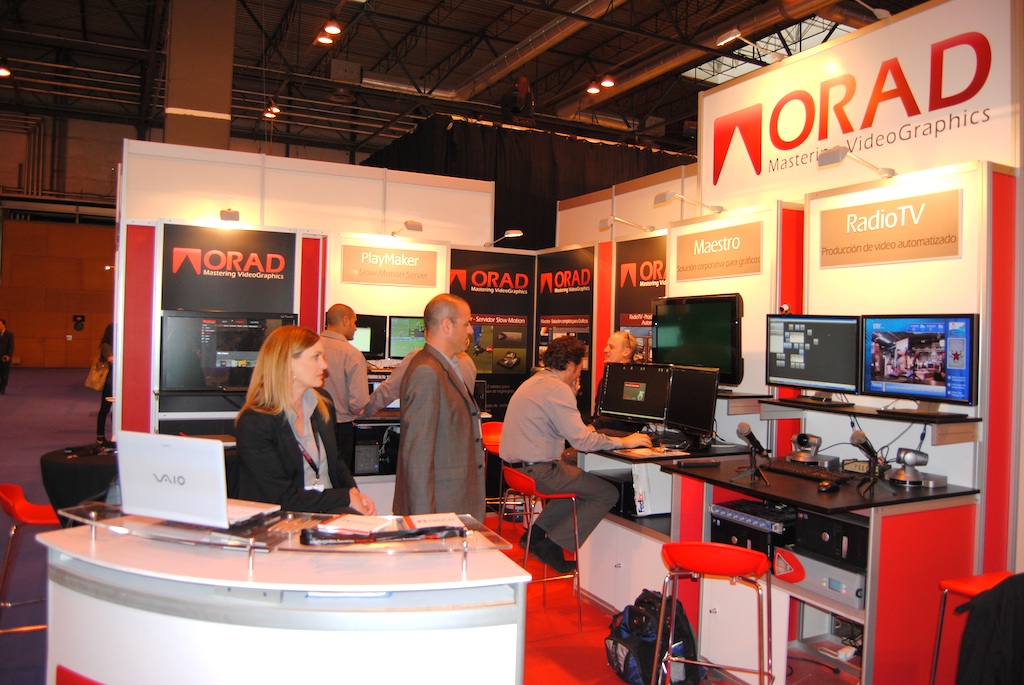
En su stand (3C11) del Salón Profesional Internacional de la Tecnología Audiovisual, Broadcast, Run está presentando, por primera vez en España, PowerPlay, una completa y rápida solución MAM deportiva creada con IBIS. PowerPlay es una solución llave en mano que gestiona producciones deportivas en directo desde la ingesta, la edición instantánea de los mejores momentos, y hasta la gestión de activos deportivos dedicados en entorno de post-producción.
Combinando el servidor de repeticiones para deportes PlayMaker de Orad y el IBIS iFind, una sofisticada solución de gestión de contenidos, PowerPlay se centra en proporcionar un servicio rápido para los torneos deportivos de gran escala, ligas y campeonatos. PowerPlay se puede implementar tanto en el estudio como en entornos de Unidad Móvil.
En un ambiente de estudio, cuando se hacen docenas de eventos deportivos en vivo cada semana, PowerPlay ingiere y edita escenas de los mejores momentos para su uso inmediato. Cada clip se etiqueta y se guarda inmediatamente en el almacenamiento y base de datos principal, haciendo que esté disponible para todos los periodistas y personal de producción.
El flujo de trabajo de PowerPlay simplifica el esfuerzo de producción, ya que no se requieren registros extra y todas las escenas destacadas son etiquetadas y disponibles para su uso inmediato en la post-producción. Abre nuevas posibilidades para el equipo de producción, con todo el material previo está instantáneamente disponible y localizable.
Con su sencillo interfaz web, los periodistas pueden buscar en la base de datos, revisar versiones proxy de imágenes, y crear ediciones al corte. Una vez creada, PowerPlay extrae una EDL (lista de decisiones de edición) para el entorno de edición no lineal con todos los clips relevantes en alta resolución. Cuando la edición no lineal termina el renderizado de la película final, lo transferirá automáticamente de nuevo a PlayMaker para su reproducción, consiguiendo una verdadera solución “end to end”, donde el flujo de trabajo completo puede aprovecharse de la inmediata disponibilidad de imágenes y metadatos.
Pensado para deportes
En producciones en vivo en UM, decenas de partidos generan cientos de horas de grabación y miles de eventos destacados como goles, intentos fallidos, las sanciones y muchos más.
Con PowerPlay OB, todos los clips son instantáneamente traspasados a los discos duros externos con todos sus metadatos. Al final del juego, los discos duros se llevan desde el camión a la instalación principal, donde los archivos se transfieren al almacenamiento y base de datos principal. Todas estas escenas destacadas estarán disponibles como contenido etiquetado, para su búsqueda y uso en post-producción, sin ningún esfuerzo adicional de captura de cintas o registros después del partido.
El registro de PowerPlay y las herramientas de búsqueda pueden ser embebidos en el flujo de trabajo de la UM, por lo que están inmediatamente disponibles para los asistentes de producción y editores de contenidos, para el programa post-partido, o cualquier otro propósito. PowerPlay permite a los operadores de repeticiones ser más eficientes, acortando el tiempo desde la ingesta hasta la edición y su vuelta para la reproducción.
Repeticiones en slow motion
Integrado con este nuevo sistema, Orad exhibe la nueva versión de PlayMaker, su servidor de video slow motion, con soporte para flujo de trabajo sin cintas (tapeless). El primer servidor de 8 canales de cámara lenta ofrece un completo flujo de trabajo sin cintas con la integración vinculada a los sistemas de edición no lineal, como Avid Media Composer y Final Cut Pro de Apple. Basado en codec DVCPro, PlayMaker puede exportar archivos junto con su meta data, ya sea en formato QuickTime o MXF, directamente a los sistemas de edición no lineal para la edición rápida y volver a importarlos para la reproducción.
PlayMaker ofrece un modo de producción de estudio dedicada, que gestiona cada entrada como una entidad separada, con sus propios clips y listas de reproducción. Este modo de trabajo puede facilitar enormemente el flujo de trabajo, reducir la mano de obra, y acortar el tiempo de entrega de producción.
Otra característica útil que se demostrará en Broadcast es el módulo Playnet que permite la creación de múltiples Playmakers trabajar en red (networking) y la transferencia de clips entre ellos. Con el clic de un solo botón, el operador puede recurrir a cualquier servidor de la red, navegar por las listas de clips a distancia o listas de reproducción, y seleccionar una para la vista previa, copiar o reproducir al instante. Para mejorar la comunicación entre los operadores de la Unidad Móvil, el módulo “Bandeja de entrada ” de los PlayMakers permiten a los operadores enviar enlaces a los clips, muy similar a como se envían mensajes de correo electrónico. Los operadores pueden ver los clips a través de la lista de bandeja de entrada y seleccionar cualquier clip que fue “enviado por correo electrónico” o para la vista previa o importación, mejorando significativamente la eficiencia de la producción.
Junto con sus otras características únicas tales como la gestión de smart clips, 8 canales, súper slow motion y soporte 3D, así como su capacidad masiva de archivo de hasta más de 60 horas de material HD, posicionan a PlayMaker en un alto nivel para hacer frente a los retos de hoy día para una rápida producción de deportes en vivo.
[youtube]http://www.youtube.com/watch?v=6Ptpey4fnSo[/youtube]
Did you like this article?
Subscribe to our NEWSLETTER and you won't miss anything.
Related articles
 Ross Video will bring its solutions for broadcast, sports and entertainment to ISE
 wTVision presentó en IBC sus últimas soluciones gráficas para producciones deportivas
 Sennheiser arrives at NAB 2022 ready to provide new immersive solutions for the broadcast world
 ESL emplea las soluciones gráficas y de control de Ross Video para el ESL One celebrado en Hamburgo
 ChyronHego ofrece en NAB soluciones gráficas para visualización en estudio e integración con bases de datos
 Orad presents Spark Tracked Telestrator for sports production at NAB
 Orad integra MAM con Social Media y proporciona notables capacidades gráficas
 TSL mostrará nuevas soluciones para loudness y control en Broadcast&Cable
 Soluciones de Orad para estudio en IBC 2012
 Orad mostrará en IBC sus soluciones para entornos deportivos
 Soluciones para grafismo y servidor de Orad en IBC 2012
 wTVision crea soluciones gráficas para dos programas de televisión en España
 Orad and IBIS announce PowerPlay, a MAM solution designed for sports
 Aicox will present new solutions for the broadcast market