





Blackmagic boosts Mac support and RAW processing in DaVinci Resolve version 17.4
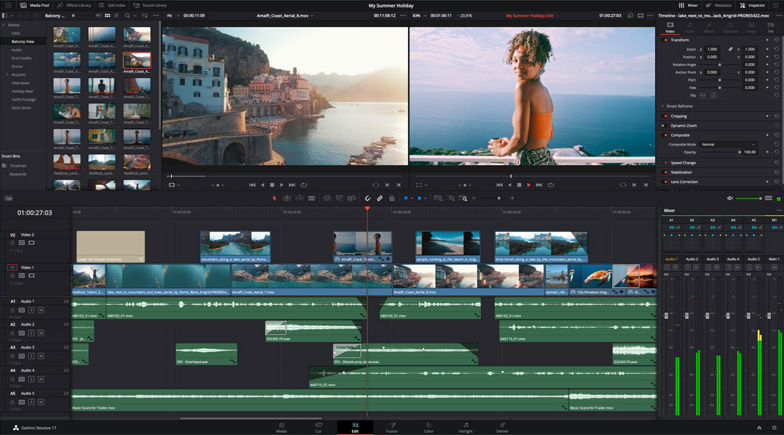
DaVinci Resolve, software developed by ブラックマジックデザイン, reaches its version 17.4 with a significant selection of new features, starring the new Mac computers and RAW file management.
The company’s latest software update optimizes performance to deliver “five times faster” processing on the new Macs with M1 Pro そして M1 Max chipsets, enabling 8K playback, editing and color correction, or working with up to 12 8K signals. DaVinci Resolve 17.4 triples the speed of decoding Blackmagic RAW 12K files and speeds up H.265 rendering。
The Blackmagic team has also improved DaVinci’s neural engine, which is now “up to four times better” in terms of real-time face recognition, object detection そして automatic reframing. In addition, support has been added for ProMotion 120Hz displays and Apple’s new MacBook HDR models.
Another important new feature in DaVinci Resolve 17.4 is the new Dropbox Replay integration, which allows you to send projects from DaVinci Resolve Studio directly to Dropbox Replay for review and approval. Markers, comments and color annotations, created in Dropbox Replay, sync “almost instantly” to the DaVinci Resolve timeline. The system also integrates enhancements such as automatic background uploads.
Edit and Fusion Module
DaVinci Resolve 17.4 also integrates enhancements to the Edit module, such as increased functionality in position curves in the timeline, which makes it easier to adjust acceleration points. It is also possible to use the DaVinci Resolve Speed Editor keyboard to switch between angles in multi-camera clips, simplifying project editing. Support for asymmetric trimming lets you change the in point of a transition without affecting the out point or vice versa for greater precision. For subtitles, this update provides automatic resizing of the background and cursor location when creating subtitles. In addition, corresponding tracks in parallel timelines now automatically fill the main timeline to speed up the process.
As for Fusion, more languages are offered with combined symbols and right-to-left scripts in Arabic and Hebrew. By combining these features with improvements in vertical layout, rotation and line direction when working with Text+, more languages and options can be used.
Color enhancements
The latest version of Blackmagic Design software provides greater support for automatic color management, making project setup faster and simpler. In addition, it supports ACES 1.3 space, including color spectrum compression, so it is now possible to display wide color spectrum images more accurately.
In addition, the ResolveFX “Custom mixer” effect allows effects to be combined and color adjustments to be made “with greater control”. In addition, a new 3D compositor offers the ability to make precise modifications to mask settings, simplifying the creation of sharper masks with precise edges. DaVinci Resolve Studio includes a new halo effect, which adds highlights or highlights to high contrast edges for a more cinematic look to your images.
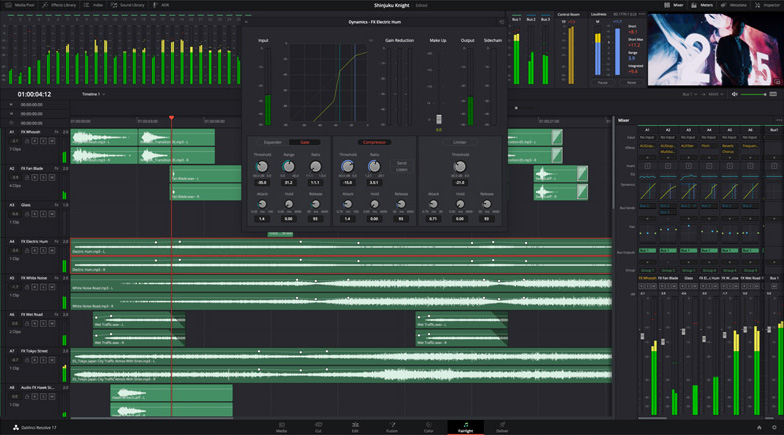
In addition, the フェアライト module now supports Steinberg VST3 plug-ins, providing access to more sound effects in the soundtrack realm. In addition, it provides the ability to use keyboard shortcuts or click-and-drag with the mouse to reorder, move and duplicate effects in the mixer, as well as view one-sided audio transitions as fades. It also provides more support for multichannel audio outputs.
Export for YouTube
Finally, DaVinci Resolve 17.4 is notable for being able to export different video chapters for YouTube. Also included are improved encoding options for YouTube’s default render settings and the ability to use the hardware-enhanced H.265 codec on Windows computers.
グラント・ペティ, CEO of Blackmagic Design, highlights the key enhancements in DaVinci Resolve 17.4: “This amazing update gives customers massive performance gains on the new Apple MacBook Pro models with the M1 Pro and Max processors. It completely transforms workflows and unlocks some incredible creative potential. What’s exciting is simply by downloading this free DaVinci Resolve update customers will get all these features for free.
“This amazing update gives customers massive performance gains on the new Apple MacBook Pro models with the M1 Pro and Max processors. It completely transforms workflows and unlocks some incredible creative potential. What’s exciting is simply by downloading this free DaVinci Resolve update customers will get all these features for free,” concludes Petty.
この記事は気に入りましたか?
購読してください ニュースレター 何も見逃すことはありません。
関連記事
 DaVinci Resolve Studio etalona, mezcla audio y crea la versión final de ‘Adam Bol’
 Blackmagic が DaVinci Resolve をバージョン 19.1 にアップデート: Fusion のエフェクトの追加、カスタム カーブ...
 「1 For All」は Blackmagic Design カメラと DaVinci Resolve に依存しています
 La nueva versión de la emblemática serie ‘Heartbreak High’, en Netflix, etalonada con DaVinci Resolve Studio
 AJA boosts third-party compatibility of the Ki Pro Go with new version 4.0
 ‘Leonor will never die’, graded with DaVinci Resolve (Blackmagic)
 Blackmagic、DaVinci Resolveバージョン17.4でMacサポートとRAW処理を強化
 ‘Gaey Wa’r’, graded with Blackmagic Design’s DaVinci Resolve Studio
 Blackmagic Design が DaVinci Resolve をバージョン 17.3 にアップデート
Blackmagic Design が DaVinci Resolve をバージョン 17.3 にアップデート
Blackmagic Design が DaVinci Resolve をバージョン 17.3 にアップデート
 Blackmagic、DaVinci Resolveの新バージョン17に300以上の新機能を追加
 Blackmagic Design は、DaVinci Resolve の新バージョンで編集、グレーディング、エフェクト作成を高速化します
 オスカー受賞者のクラウディオ・ミランダは、Blackmagic の DaVinci Resolve Studio と DaVinci Resolve Mini Panel を信頼しています
 La versión beta de DaVinci Resolve 11 ya está disponible