





wTVision modernizes broadcast workflow with VVTR
Inspired by the reliability of the VTR, this new tool allows you to access previously recorded clips from an integrated clip library, record baseband video with up to 16 audio channels, choose your own codec and file format and preview inputs/outputs directly in the user interface multiviewer.
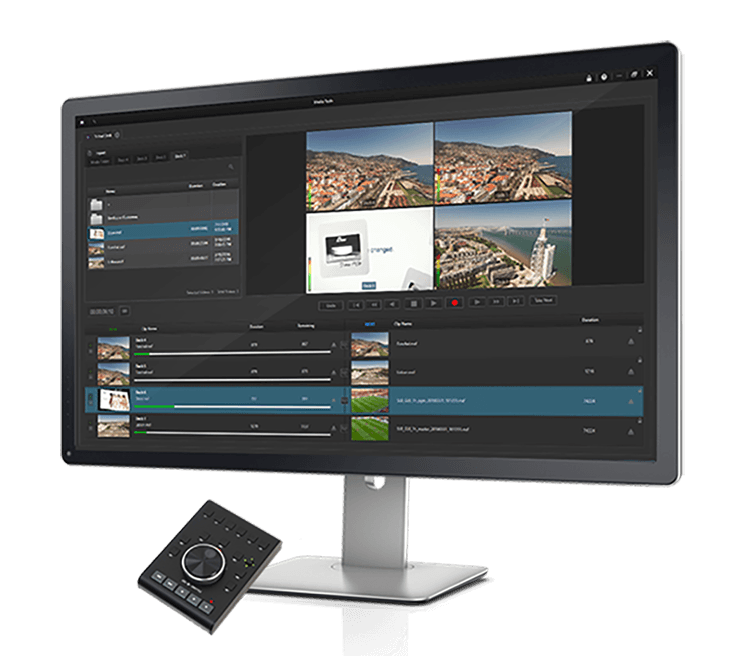
wTVision presented its new solution at the last IBC VVTR, an intuitive digital product designed to replace a VTR normal professional streaming and modernize the broadcast workflow.
Inspired by the reliability of the VTR, this new tool Allows access to previously recorded clips from a built-in clip library, record baseband video with up to 16 audio channels, eread your own codec and file format and preview inputs/outputs directly into the multiviewer UI.
VVTR can be used as a manual redundancy for playback automation, ensuring content continuity as a backup tool. Replaces traditional VTR and allows any operator to have a redundant manual route to play and keep ads ready to launch in the event of an automation failure. Even if the entire workflow collapses, VVTR is a simple tool that does not need any complementary systems to ensure manual redundancy and continuous playback of any channel.
To ensure that your digital content transfers do not fail, wTVision has designed a Multi FTP downloader as a companion app for VVTR. It caches content from multiple FTP servers and facilitates media discovery and easy file retrieval from multiple destinations to existing automation locations.
The VVTR is a self-contained system. You can record and playback clips in a variety of codecs and file formats, such as XDCAM 50 or IMX30 to MXF files. The VVTR records subtitles in WST/Op-47, 608 and 708.
Main features
- Four channel input/output configuration
- Clips can be recorded and played back in a variety of codecs and file formats
- Records up to 16 channels of audio
- Show videos directly in the user interface
- Recording and playback of closed captions
- Ability to select multiple outputs
- Ability to choose a folder per channel
- Jump to a specific frame in a selected clip
- Allows controls to be locked
Did you like this article?
Subscribe to our NEWSLETTER and you won't miss anything.
Related articles
 Swiss university FHNW modernizes its audiovisual workflows with AJA equipment
 KRA reinforces its workflow with AJA Ki Pro GO recorders
 wTVision demonstrates its integrated workflows for sports, MCR and PCR productions at IBC
 Noa will debut version 4.1 of its jobDB workflow system at IBC
 wTVision to present integrated workflow for sports, PCR and MCR at IBC
 wTVision graphics enriched the Eurovision 2018 broadcast for 43 European countries
 AJA expands its IP-based workflow technology
 Estructure optimizes any workflow with EasyFlow
 Archimedia accelerates workflow with Iris
 MOG Technologies breaks boundaries in workflow
 The Look post-producer improves its workflow with Pablo Rio
 FilmLight – End-to-End Color Workflow
NewTek improves workflow with Tricaster 850 TW
FilmLight – End-to-End Color Workflow
NewTek improves workflow with Tricaster 850 TW
 Sony improves workflow in XDCAM