





Atresmedia Radio makes the leap to Echo, the family of Amazon devices with Alexa
Las emisoras del grupo Atresmedia dan el salto a los altavoces inteligentes de Amazon, acercando los contenidos de Onda Cero, Europa FM y Melodía FM a las nuevas formas de consumo de radio que ya han empezado a llegar.
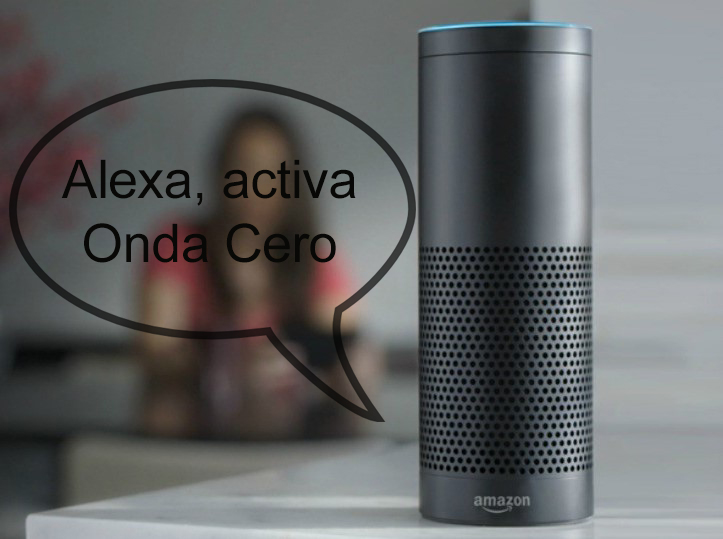
Atresmedia Radio da un paso más en su estrategia para adaptarse a las nuevas posibilidades y formas de consumo radiofónico que van llegando gracias los nuevos desarrollos tecnológicos.
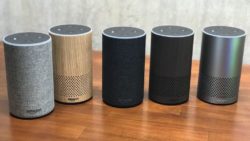
Así, y como consecuencia de ello, las emisiones en directo de Onda Cero, Europa FM y Melodía FM ya pueden seguirse a través de la familia de dispositivos Echo, los nuevos altavoces que Amazon acaba de lanzar en España y que integran Alexa.
Para ello, Onda Cero, Europa FM y Melodía FM disponen de sendas skills (denominación de las aplicaciones de voz en Alexa), que permiten sintonizar dichas cadenas de radio en directo a través de Alexa, facilitando una nueva forma de acceder de manera sencilla a los contenidos de las emisoras de Atresmedia.
Alexa ofrece la posibilidad de acceder a los directos de las tres cadenas de Atresmedia Radio. Para ello, primero hay que activar la skill diciendo “Alexa, activa Onda Cero” (o Europa FM o Melodía FM) y para abrir la skill las siguientes veces, el usuario dirá “Alexa, abre Onda Cero” (o Europa FM o Melodía FM).
Alexa permite también disponer a demanda del último boletín informativo de Onda Cero. Para ello, primero hay que activar la skill diciendo “Alexa, activa Noticias Onda Cero”. Después basta con preguntar cuando se desee “Alexa, ¿Cuáles son mis noticias”.
Del mismo modo, a través de la familia de altavoces Echo de Amazon, los usuarios pueden disfrutar del monólogo de las 8 de la mañana de Carlos Alsina y los comentarios de José Ramón de la Morena y Fernando Ónega en more than one, la reflexión de Juan Ramón Lucas en La brújula, y el análisis de Elena Gijón en Noticias mediodía. Para ello hay que activar a skill deseada, invocando “Alexa, abre (nombre de la skill)” para situarla como predefinida. Después hay que pedir “Alexa, cuáles son mis noticias” para poder escuchar el contenido cuando se desee.
Además, también es posible escuchar los podcasts de Onda Cero. Para ello, hay que decir “Alexa, activa el podcast (nombre del podcast)”. Después, basta con decir “Alexa, quiero escuchar el podcast (nombre del podcast)”.
Did you like this article?
Subscribe to our NEWSLETTER and you won't miss anything.
Related articles
 Radio Barcelona (Cadena SER) takes a technological leap with Aspa
 Atresmedia and Diagonal will narrate the life of Gervasio Deferr in the series 'The Great Jump'
 Croatian Radio Labin makes the leap to IP with the AEQ Capitol console
 Visual radio at Atresmedia: The future of the medium or an ephemeral present?
 Atresmedia Studios produces 'Football Players around the World' for Amazon
 Radio San Vicente goes digital with AEQ Capitol IP
 Atresmedia trusts Amazon Web Services (AWS) for a hybrid cloud environment
 Amazon will adapt 'La templanza' to television with production by Atresmedia Studios
 'Little Coincidences', the first Spanish series produced by Atresmedia Studios for Amazon Prime Video, comes to the screen
 RTVE launches its first applications for Amazon devices that incorporate Alexa
 'Little coincidences', the new project from Atresmedia Studios, will debut on Amazon Prime Video
 Amazon closes an agreement with TVE, Atresmedia and Mediaset for the distribution of its series on Amazon Prime Video
 Atresmedia series make the leap to Amazon
 ARRI Alexa SXT: a new step in the Alexa family, now with ProRes 4K UHD and 4K recording