





La app Blackmagic Camera desembarca en Android
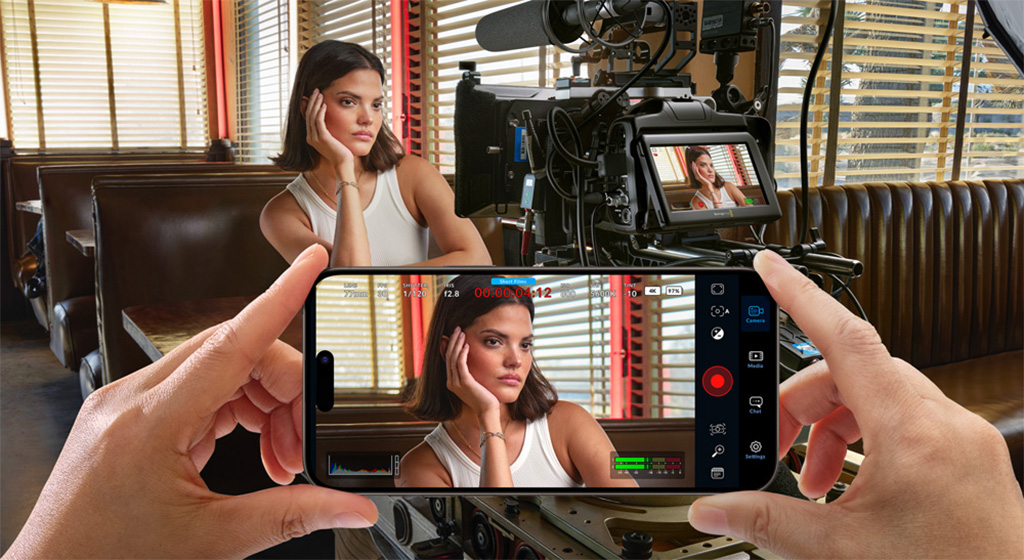
Tras su estreno en el ecosistema iOS, la app Blackmagic Camera llega a teléfonos seleccionados de Samsung y Google Pixel para brindar controles y prestaciones cinematográficas de las cámaras de smartphones con el sistema operativo Android.
Blackmagic Camera permite aprovechar el potencial de la cámara integrada de un teléfono mediante una app con diversos controles de cámaras cinematográficas digitales. El sistema integra la misma interfaz de los modelos profesionales de Blackmagic Design, de forma que el usuario, pulsando la pantalla, podrá modificar parámetros como la frecuencia de imagen, el ángulo de obturación, el balance de blancos y la sensibilidad ISO, o grabar archivos ProRes de 10 bits con resolución 4K y compartirlos mediante la plataforma Blackmagic Cloud.
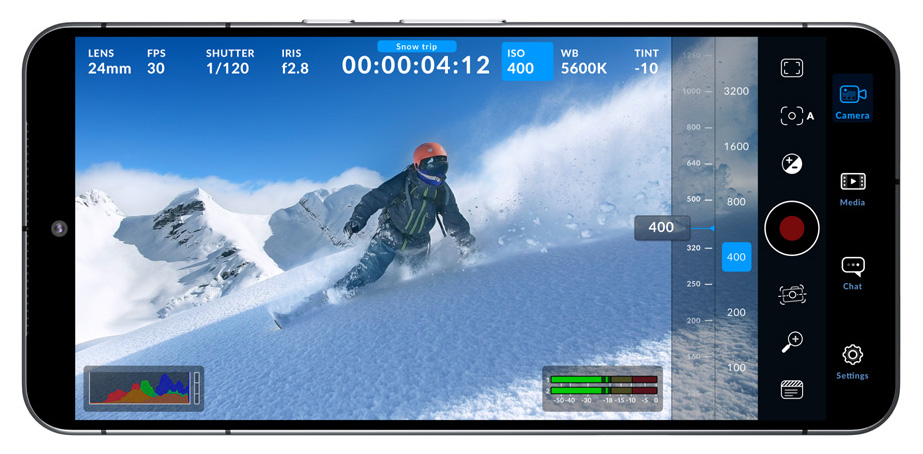 La interfaz de Blackmagic Camera es interactiva y permite modificar los parámetros con agilidad, sin necesidad de acceder a menús confusos. Muestra el estado de la unidad y de la grabación, el histograma, los indicadores de enfoque, el nivel del audio, las guías de encuadre y otros datos superpuestos a la imagen. Para visualizar u ocultar esta información, basta con deslizar el dedo sobre la pantalla hacia arriba o abajo. El sistema también permite enfocar automáticamente pulsando la pantalla sobre el área deseada, así como filmar con relaciones de aspecto verticales o en formato 16:9.
La pestaña de configuración de la solución de Blackmagic permite aprovechar al máximo la cámara del teléfono y acceder rápidamente a distintos ajustes avanzados para la grabación, el audio y la monitorización, entre otros. En este sentido, las opciones de grabación brindan un control absoluto sobre la resolución y facilitan el procesamiento de archivos en formato H.264 y H.265, que ocupan un menor espacio de almacenamiento. Blackmagic Camera incluye además herramientas de monitorización profesionales, tales como la función Cebra.
Integración con la nube y DaVinci
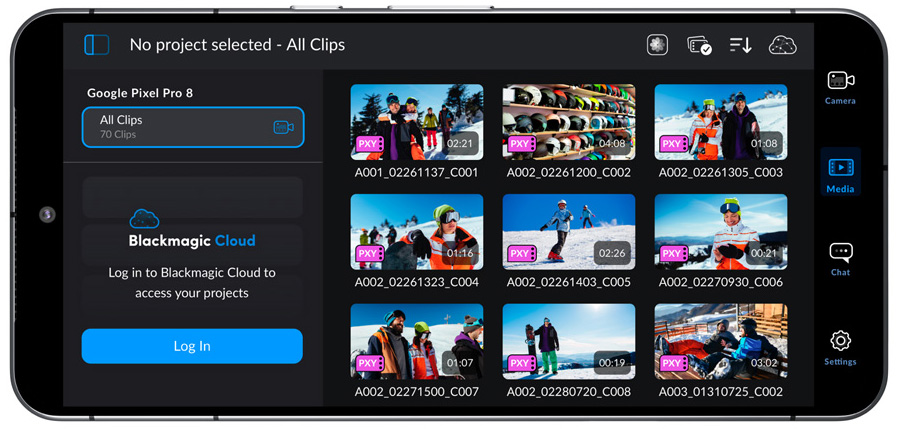
The organización de archivos en la aplicación es sencilla, ya que existen tres opciones según la ubicación y la cobertura de datos móviles. Es posible grabar en la memoria del teléfono y transferir los clips a un equipo informático, lo cual permite liberar espacio de almacenamiento y compartir los archivos posteriormente con otros usuarios en todo el mundo. Por otra parte, también se puede acceder a la plataforma Blackmagic Cloud y seleccionar un proyecto de DaVinci Resolve antes de comenzar a grabar. El material grabado se subirá automáticamente y estará a disposición de todos los participantes del proyecto. A su vez, Blackmagic Camera también ofrece una opción manual que brinda la oportunidad de almacenar el material grabado en la memoria del teléfono y seleccionar los clips que luego se subirán a Blackmagic Cloud al disponer de una conexión de red. Para agilizar aún más los procesos, es posible vincular la carpeta DCIM y seleccionar secuencias para subirlas a Blackmagic Cloud.
Otra posibilidad al grabar con Blackmagic Camera es la subida de los archivos en proxy, seguidas de los originales de la cámara, para almacenarlos mediante Blackmagic Cloud Storage. Además, todas las personas que participen del mismo proyecto tendrán acceso al material grabado automáticamente. También es posible añadir secuencias captadas con diversas cámaras en diferentes lugares, las cuales estarán a disposición de los demás usuarios de manera automática a través de Blackmagic Cloud.
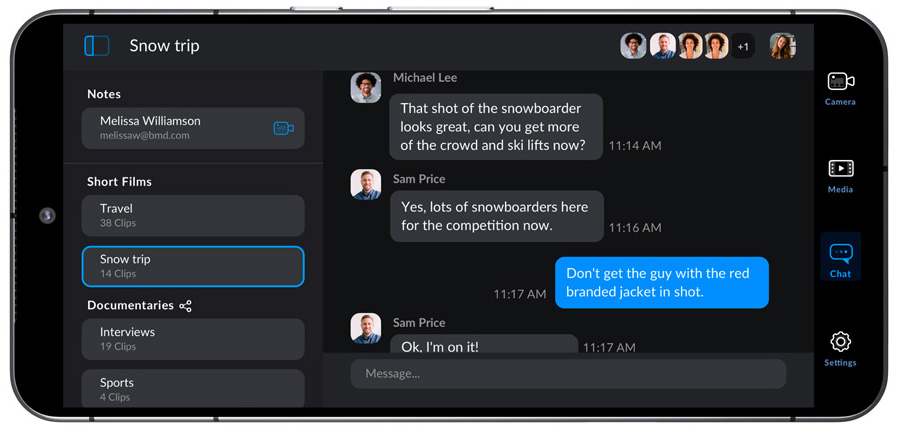 Adicionalmente, Blackmagic Camera incluye un sistema de comunicación que permite a los miembros de un proyecto compartido en Blackmagic Cloud intercambiar rápidamente ideas creativas sobre las diferentes tomas sin salir de la aplicación. Basta con acceder a la plataforma, seleccionar el proyecto y escribir un mensaje. Esto brinda la oportunidad de comunicarse al instante con otros editores, asistentes, coloristas o especialistas de efectos visuales.
Did you like this article?
Subscribe to our NEWSLETTER and you won't miss anything.
Related articles
 La aplicación Blackmagic Camera para Android alcanza su versión 2.0 con importantes novedades
 Blackmagic Camera app lands on Android
 Blackmagic further evolves Blackmagic Camera app with version 1.3
Blackmagic continúa evolucionando la app Blackmagic Camera con la versión 1.3
Blackmagic further evolves Blackmagic Camera app with version 1.3
Blackmagic continúa evolucionando la app Blackmagic Camera con la versión 1.3
 Blackmagic Pocket Camera and Cinema Camera 6K expand their capabilities with 8.6 software
Las Blackmagic Pocket Camera y Cinema Camera 6K amplían sus posibilidades con el software 8.6
Blackmagic Pocket Camera and Cinema Camera 6K expand their capabilities with 8.6 software
Las Blackmagic Pocket Camera y Cinema Camera 6K amplían sus posibilidades con el software 8.6
 Oleada de novedades Blackmagic en IBC 2023: Cinema Camera 6K, Studio Camera 4K Plus G2…
 ‘Deadline’ triunfa en Cannes con el look de la Pocket Cinema Camera 6K de Blackmagic
 Blackmagic brings EF mount and a 6K sensor to its new Studio Camera 6K Pro broadcast camera
 Blackmagic presenta nueva cámara: Pocket Cinema Camera 6K G2
 ‘Simone vs Herself’, rodada con la Pocket Cinema Camera 4K de Blackmagic
 Blackmagic Design amplía su familia Studio Camera con los modelos 4K Plus y 4K Pro
 Blackmagic permite ahora dar formato a dispositivos de almacenamiento desde las Cinema Camera y Pocket Cinema Camera
 Blackmagic Design baja el precio de la Production Camera 4K