




Orad Morpho 3D: a solution for flexible, powerful and easy-to-use 2D and 3D on-air graphics
Bringing together in a turnkey solution the creation of 2D and 3D graphics with a powerful rendering engine and integrating a wide range of multimedia resources in a platform with great ease of use, has been the objective set by Orad to conceive Morpho 3D. The platform is able to take full advantage of the robustness of Linux for rendering and play-out and the ease of use of Windows XP for presenting the user interface.
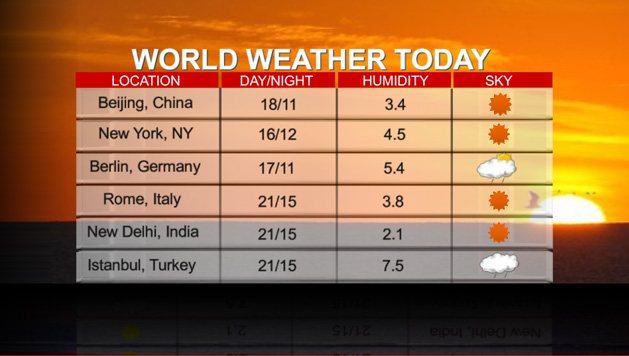
Having an online graphics system that brings together a wide range of multimedia resources, taking advantage of the maximum performance of Linux for rendering and play-out and the operational ease of Windows XP to interact very easily with the user... is now a reality. It is called Morpho 3D and it is a turnkey solution that is supplied on a 2U chassis that is barely the size of a computer CPU (DVG 2U). In this way, the only thing we will need to have this advanced graphic solution ready is a computer monitor to see the interface and an HD monitor for play-out. One of the many advantages of this system is that it incorporates a linear key system that allows you to play video clips in almost all formats, including AVI, QuickTime and MPEG. From the extremely simple interface of Morpho 3D, the user can integrate several 3D graphic layers in real time by simply dragging and dropping pages, as well as prepare and launch graphic sequences into the air with just the press of a button.
 What is most striking about the Morpho 3D is its intelligent design and the robustness given by the fact that it is actually supported by two parallel computer systems on two operating systems (Linux and Windows). The advantage of this architecture is that while on Linux the rendering and the tasks that require the most CPU are carried out at high speed, and without surprises, on Windows XP the interface of Morpho 3D itself runs, as well as other applications such as Adobe Photoshop or PowerPoint, for example. Separating operating systems into independent units also protects the Linux operating system and system kernel from possible virus attacks. Which provides complete peace of mind when integrating this solution into a production chain.
 SD and HD graphics
Morpho 3D allows you to work in both SD and HD environments, being able to switch with an SDI video input, SDI and two outputs with VGA preview capability. In addition, it is compatible with practically all HD and SD formats and with most of the most common frame rates.
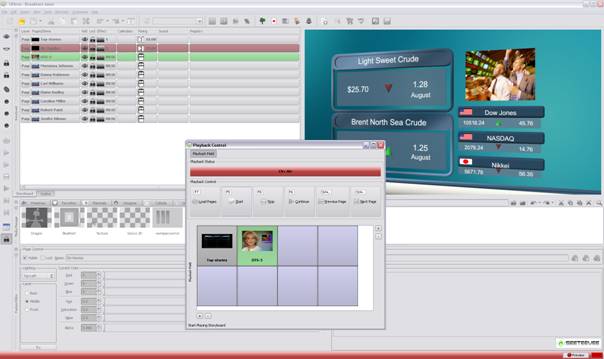
One of the most outstanding aspects of Morpho 3D is that the operator can import layers from Photoshop or Collada 3D, include preselected 3D graphics, video clips or photos by simply dragging them into its interface. In addition, it allows you to directly take text from any RSS feed or database, presenting the data in real time on the screen, even automatically converting plain text into 3D. To facilitate its use, its friendly interface is divided into four areas (Storyboard, Preview, Media Manager, Editor), from which to work on the different specific stages in creating graphics. From the Storyboard area we can create pages, order them and mark them with duration parameters, entrance and exit effects...
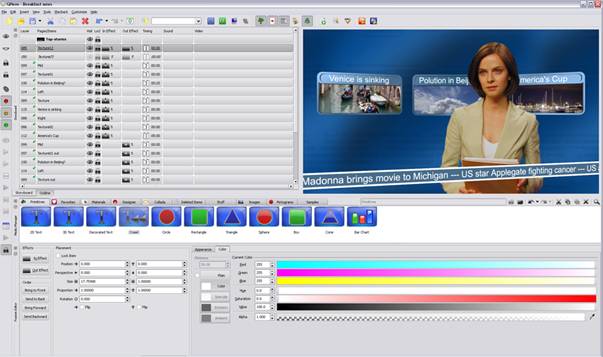 The preview window allows you to instantly see the composite result of all the combined graphic elements. From here we can directly drag the different graphic elements, change their appearance, size or position by placing them on different layers in a highly intuitive way...and quickly! From the Media Manager window we find the entire library of graphic elements that we have available, being able to drag most of them directly from the preview to the page itself. Orad has incorporated a good number of elements and objects into the solution, although logically you can customize the library with countless graphic assets. We can carry out the fine-tuning and creative manipulation from the editing area. From this window we can instantly convert 2D text into 3D by marking characteristics such as the bevel shape, color (with full RGB control, and with the possibility of using a gradient or eyedropper selection), texture, brightness or opacity. We can even create different light sources with their corresponding effect on the text. Thus, any minimally savvy operator, in a matter of minutes, can be 'playing' with graphic elements or labels, resizing or rotating them with the help of a simple mouse (it also allows the direct use of position and movement parameters).
From the interface we can control the entry/exit of the pages or all the elements that compose it, their movement or their effects at all times. The Morpho 3D interface also provides advanced control over the output order of pages or any other elements, previously determining the sequence or improvising it in real time. For example, it allows you to separately manage the layer in which the logo of a chain or program is located with respect to the layer of a ticker, thus being able to display it at all times at the top, bottom or full screen.
As for subtitles, they can be generated directly on the time code with their corresponding link to the text base. Once the graphic is prepared, launching it into the air is as simple as selecting 'Play' to start the sequence or opening the playback controller and having manual control at all times to change the sequence of a page or alter the order of the elements that will then appear on the screen. Furthermore, it is striking that the editing window is accessible at all times, so we could alter the elements just seconds before they go on air, even if the sequence has started.
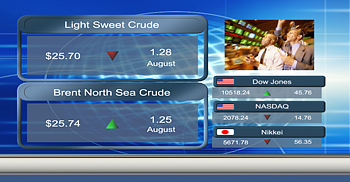
An important tool for news channels or sports or stock programs, for example, is the possibility of automating access to RSS feeds by adding them directly to the system, and can even convert selected data into 2D or 3D graphics. It also supports sending animated graphics to the Internet and applying an editing system timeline to them, thanks to its ability to output clips in a variety of formats.
3D Composition
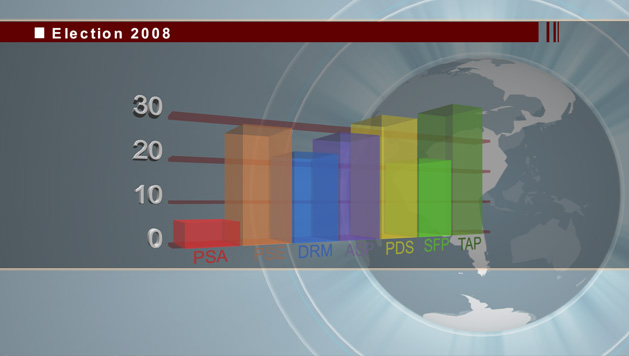
Aunque obviamente, Orad Morpho 3D no es ni mucho menos una solución de composición, y tampoco lo pretende, la realidad es que con él puede llevarse a cabo la mayoría de operaciones de composición que día a día se dan en cualquier televisión. Con la ventaja de ser un sistema mucho más sencillo que los complejos sistemas de composición del mercado. Acciones tan complejas como el posicionamiento de luces o la gestión optimizada de Z-ordering son fácilmente realizables desde Morpho 3D. A fin de cuentas, las funciones más usadas en este tipo de soluciones como el color, el desplazamiento, la velocidad, el reflejo y espejado, la textura o la fuente de luz se controlan fácilmente y con total rapidez. En realidad, y salvando las distancia, crear gráficos y movimientos en Morpho 3D es tan fácil como usar un PowerPoint.
Por último señalar que Morpho 3D puede integrarse con la mayoría de sistemas de automatización y newsroom a través de los principales protocolos de la industria. Orad comercializa esta solución en inglés, francés, portugués, español, ruso, alemán, japonés y chino, estando basado 100 en arquitectura compilada 100% Unicode.
Orad Morpho 3D
- Conmutable SD/HD
- Creación de gráficos 2D y 3D
- Vídeo y clips como texturas sobre cualquier objeto
- Play-back de gráficos tanto secuencial como en random
- Soporte a la mayoría de estándar gráficos como Photochop y 3D Collada
- Trabajo con bases externas como feeds RSS, MS Excel y SQL
- Integración con la mayoría de sistemas de automatización y newsroom
- Multilenguaje 100% Unicode
- Interfaz en múltiples idiomas
- Control de emisión secuencial o automatizada
- Potentes herramientas para tickers
- Previo VGA
- Entrada de vídeo SDI
- Control de vídeo y corrección
- Generación de caracteres 2D y 3D
- Efectos de sonido
- Importación de objetos 3D desde Orad 3Designer y modelos 3D desde Collada
- Deshacer ilimitados incluso después de grabar
Did you like this article?
Subscribe to our NEWSLETTER and you won't miss anything.
Related articles
 Fastly provides Atresmedia with a flexible and scalable solution for live streaming on Atresplayer
 Medialooks Provides eSports Giant ESL with Powerful Video Transport Solution
 Aston, the most innovative solution for 3D graphics from Brainstorm, at NAB 2018
 Central China Television (CCTV) uses Orad immersive graphics for 2015 Spring Festival gala
 Viz Opus: Vizrt launches a powerful solution for control room
 Orad upgrades its Morpho video wall solution to 4K
 Orad lanza el nuevo Morpho 3.0
 RFI deploys RadioTV, Orad's solution for automated TV production
 Orad iFind MAM expands its production workflow design capabilities for graphics and audio
 Orad will launch the new version of Morpho at IBC
 Studer OnAir 1500, a flexible solution for broadcast and production
 Orad to Demonstrate Turnkey News Graphics Workflow at IBC
 Orad and IBIS announce PowerPlay, a MAM solution designed for sports
 Morpho 3D 2.0: spectacular real-time graphics with Orad at Broadcast'09