





What to take into account when choosing an SD card?
Muchas veces tendemos a pensar que todas las tarjetas de memoria Secure Digital son iguales, basando únicamente nuestra decisión de compra en el precio. Pero, ¿estamos seguros de confiar una grabación única a cualquier soporte? ¿qué parámetros hay que considerar antes de decantarse por una tarjeta? ¿qué relación tiene la capacidad con la velocidad? ¿en caso de desastre, cómo podremos recuperar nuestros datos?….
Secure Digital (SD) es un dispositivo de almacenamiento que conserva la información aún con pérdida de energía, es decir, es una memoria no volátil. Desarrollada inicialmente allá por 2005 por Matsushita (Panasonic), este formato de tarjeta de memoria se utiliza hoy en un sinfín de dispositivos tanto de consumo como profesionales de las más altas exigencias.
Muchas veces tendemos a pensar que todas las tarjetas de memoria Secure Digital son iguales, basando únicamente nuestra decisión de compra en el precio. Pero, ¿estamos seguros de confiar una grabación única a cualquier soporte? En un mercado con cada día mayor competencia no todo es cuestión de precio sino que la fiabilidad y durabilidad del soporte son factores a tener muy en cuenta en trabajos críticas como es la captación y almacenamiento de vídeo.
Pese a que las tarjetas Compact Flash, con mejores prestaciones pero de un mayor tamaño, irrumpieron con fuerza en el mercado profesional, en cuanto a soportes no propietarios y exclusivos de grabación el formato Secure Digital (SD) ha terminado por imponerse en todo tipo de dispositivos de consumo, y muy ampliamente en el mercado profesional.
Las SD dieron sus primeros pasos con capacidades que apenas rondaban los 16, 32 o 64 MB. Sin embargo apenas un año más tarde, een 2006, se alcanzaron los 8 GB y ya en 2007, los 16 GB. Y cuando todo el mundo pensó que este tipo de memorias de estado sólido había alcanzado techo, nos encontramos que hoy disponemos en el mercado de opciones de almacenamiento que alcanzan hasta los 2 TB.
De esta forma, en menos de una década hemos pasado de las primeras SD (Secure Digital) con capacidades apenas para 2 GB a las Secure Digital High Capacity (SDHC) y la nueva generación Secure Digital eXtended Capacity (SDXC) con capacidades de hasta 2 TB en una minúscula tarjeta.
¿Qué información nos aporta el soporte?
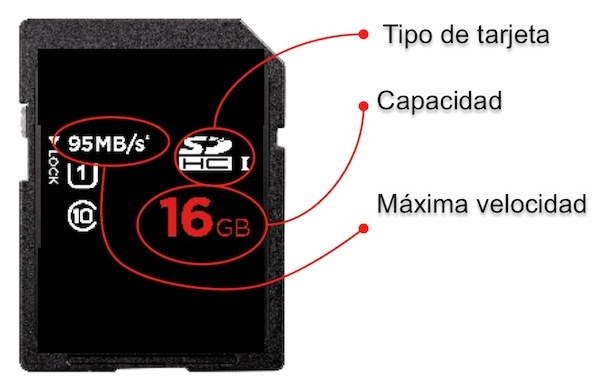
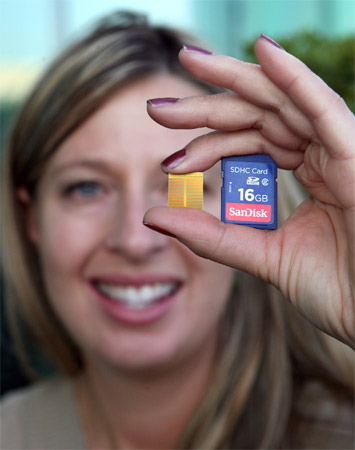
Todas las tarjetas disponen impresa de una información que al profesional le resultará muy útil para optar por un soporte fiable según el uso que vaya a darle. Las tarjetas vienen claramente identificadas con el tipo de tarjeta (SD, SDHC o SDXC), su capacidad, velocidad máxima (a mayor velocidad más rápido se almacenan las imágenes) y velocidad de Video Class (mínima velocidad).
La mayoría de los fabricantes imprimen en sus tarjetas solo la velocidad de lectura (más alta que la de escritura).
Por lo general, tendemos a fijarnos únicamente en la capacidad, pero ¿y la velocidad de acceso? En entornos profesionales es un parámetros a tener muy en cuenta ya que aunque un almacén sea muy grande, si su puerta de acceso es muy pequeña, llenarlo o sacar cosas de él se convertirá en una auténtica tortura y una pérdida de tiempo que en la mayoría de trabajos resulta un factor clave.
MB/s vs. velocidad “X”
En la mayoría de tarjetas encontramos una información que a priori puede ser muy críptica pero que aporta un dato significativo: “la X”. ¿Qué es la esa X que encontramos en las tarjetas? Partiendo de que la la velocidad de un CD es de 150 kb/s o lo que es lo mismo 15 MB/s, podremos conocer cuántas “X veces” será más rápido nuestro soporte.
Algunos fabricantes solo publican la velocidad de sus tarjetas utilizando las directrices ‘X’, aprovechándose muchas veces de la falta de conocimiento del usuario. Sin embargo, fabricantes de primera línea en este tipo de tarjetas, como SanDisk, especifica claramente en sus soportes tanto la ‘X’ como la velocidad expresada en MB/s.
Así pues, ésta sería la equivalencia de velocidad “X veces” en relación a MB/s:
- 133x = 20MB/s
- 200x = 30MB/s
- 300x = 45MB/s
- 400x = 60MBs
- 600x = 90MB/s
- 633x = 95MB/s
- 667 = 100MB/s (666.66x)
 Cuestión de clases
En todo hay clases, y en el, a veces intrincado, mundo de las tarjetas no iba a ser menos. En muchos de estos soportes encontramos la velocidad de vídeo Class. ¿Qué es esto? La velocidad de vídeo Class no tiene por qué determinar una compra, constituyendo una medida incorrecta en la que basar una decisión de compra si se desconoce qué uso se le va a dar al soporte.
Cada tarjeta SDHC tiene asociada una clase cuya clasificación ha sido definida por la SD Card Association como un indicador a la hora de valorar la tasa de transferencia de datos sostenida garantizada de una determinada tarjeta.
Actualmente las velocidades mínimas garantizadas de transferencia que aseguran las tarjetas han sido estandarizadas con las siguientes nomenclaturas:
- C2: tasa de transferencia de datos sostenida garantizada de 2 MBPS de información
- C4: 4 MBPS
- C6: 6 MBPS
- C10: 10 MBPS
En producción de vídeo, si trabajamos a 72p o HD bastará con una Class 6 mientras que para resoluciones de vídeo superiores como 1080p o Full HD deberemos ir a una Class 10.
Usar una velocidad de vídeo class equivocada no sólo ralentizará nuestro trabajo sino que podría perjudicar la mecánica interna de la cámara pudiendo provocar un recalientamiento que detendría por seguridad la grabación para proteger a sus componentes.
Por lo tanto, escoger una velocidad de vídeo Class equivocada puede dañar la cámara, por eso es importante coordinar la velocidad de vídeo Class correcta con el dispositivo adecuado y la velocidad en la captación de imágenes con la que trabajemos.
 Condiciones extremas
Aunque el desarrollo del estado sólido supuso un gran avance en la captación de imágenes en condiciones extremas frente a sistemas giratorios magnéticos como los discos duros, la verdad es que en relación a las vibración, temperatura o humedad, también encontramos grandes diferencias entre tarjetas.
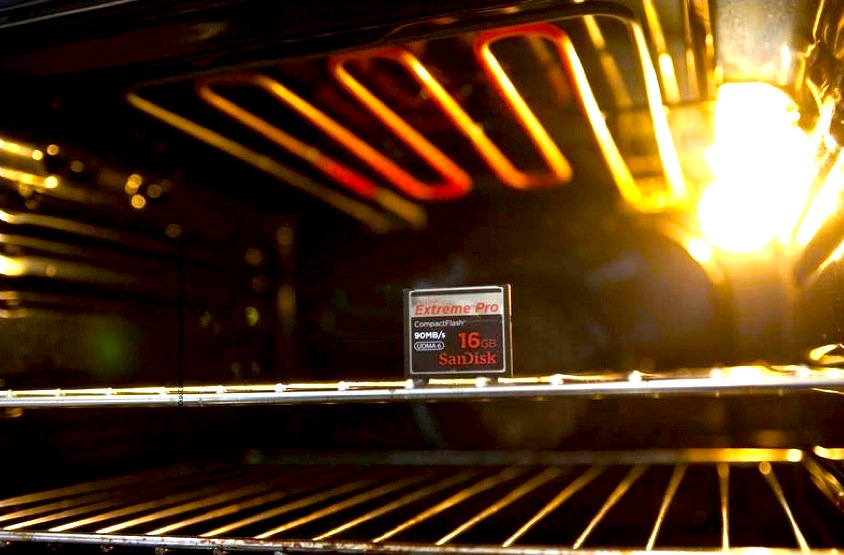
Fabricantes como SanDisk cuentan con tarjetas específicamente desarrolladas para trabajar en las condiciones más duras. Su serie Extreme está pensada para soportar temperaturas extremas y vibraciones continuadas. Funcionan en cualquier lugar donde los humanos puedan vivir y trabajar.
Pero, ¿y que ocurre si desgraciadamente pierdo mi información? SanDisk, por ejemplo, ofrece a sus clientes un software de recuperación de datos incluido gratuitamente con todos los productos para imágenes etiquetados como Extreme. Además, funciona con todo tipo de memorias flash. Rescue Pro Deluxe es una versión profesional incluida en los productos Extreme Pro y compatible con los conversores a cámaras digitales. Para acceder a él, bastará con canjear el cupón canjeable con un código de activación y obtener un año de suscripción a este interesante servicio.
Did you like this article?
Subscribe to our NEWSLETTER and you won't miss anything.
Related articles
 Telemadrid once again chooses Sennheiser Digital wireless microphones
 The spectator will be able to choose between real or virtualized sound in the return of LaLiga
 NewTek TalkShow VS 4000: a solution to take into account when contributing from home
 Hollywood once again chooses Tenerife for the filming of a blockbuster
 Danmon Group professionals will help NAB 2018 visitors choose the best technology
 Clear-Com now has a Dante interface card for its intercoms
 Precise calibration in 4K HDR, a key to take into account
 ¿Qué óptica elegir para producción 4K?
 The selection process begins to choose the winner of the Hispasat Award
 How to choose the right encoding for the success of your online video
 ¿Qué tener en cuenta al elegir un servidor de media?
 Tv Loves Africa: an event to take into account in an emerging continent
 Viral or syndicated? Keys to choosing the online video strategy
 Autodesk Smoke on Mac: an alternative to take into account for editing and finishing