





The documentary series 'Climate Fightback', graded with DaVinci
Al enfrentarse con una cantidad abrumadora de imágenes en varios formatos, el colorista Luo Chengyuan tuvo que terminar la clasificación de color para los tres episodios en seis días, con cada episodio consistente en 700 u 800 tomas.
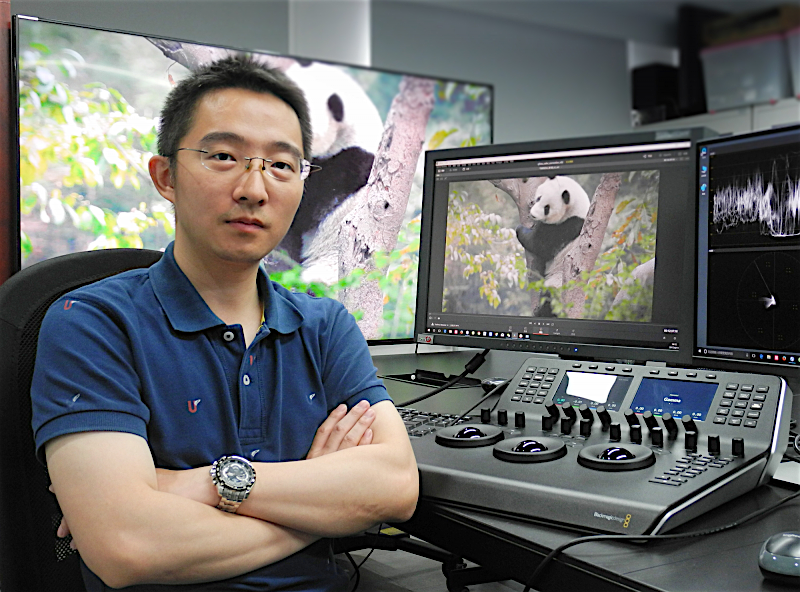
Climate Fightback, un documental de tres episodios producido por Entertainment Co. para la Televisión Central China (CCTV) ha empleando la solución DaVinci Resolve Studio, junto con un DaVinci Resolve Mini Panel, de Blackmagic Design, en su postproducción y acabado.
El documental refleja los esfuerzos de la humanidad en aras de enfrentar los cambios climáticos surgidos a partir de la industrialización. Los doce meses de grabación dieron como resultado una cantidad inmensa de material grabado que incluía 50 TB de datos únicamente del equipo de producción chino.
Al enfrentarse con una cantidad abrumadora de imágenes en varios formatos, el colorista Luo Chengyuan tuvo que terminar la clasificación de color para los tres episodios de Climate Fightback en seis días, con cada episodio consistente en 700 u 800 tomas. Esto significaba que era crucial que el sistema de edición y el sistema de colores trabajaran juntos para lograr la máxima eficiencia.
Debido a que se trata de un documental sobre la naturaleza, el director quería que Chengyuan se asegurara de que la reproducción del color fuera precisa y coherente. Esto fue fácilmente alcanzable gracias al amplio conjunto de herramientas de DaVinci Resolve junto con la funcionalidad del DaVinci Resolve Mini Panel.
“Este proyecto requería que los equipos de edición y etalonaje trabajaran juntos, con un margen de entrega muy ajustado, de modo que no podíamos perder el tiempo. Estimábamos que nos llevaría unos tres días completar el conformado y la copia del material obtenido, por lo que el director decidió emplear una dinámica de trabajo basada en la función ‘Detección de cortes de escena’ de DaVinci Resolve, lo que nos permitió ahorrar ese tiempo, así como espacio en el disco duro”, ha asegurado Chengyuan.
Gran precisión
Hablando acerca de la precisión de esta herramienta agregó que “es capaz de reconocer más del 95% de los cortes, y solo el primer capítulo contenía 780 tomas en total, aunque tras emplear esta función, dicha cifra aumentó a 885. Las secuencias adicionales eran fundidos a blanco y disoluciones que en general ayudan a visualizar los grupos de cortes de escena. Todo lo que tenía que hacer era eliminar esos puntos de corte. Detectar las escenas en un episodio me llevó cuatro minutos y medio, y tardé menos de cuarenta en buscar las transiciones y eliminar los puntos que se habían agregado. Una vez realizado este proceso, el número de tomas se redujo a 745, lo que en mi opinión es bastante preciso en comparación con las 780 originales”.
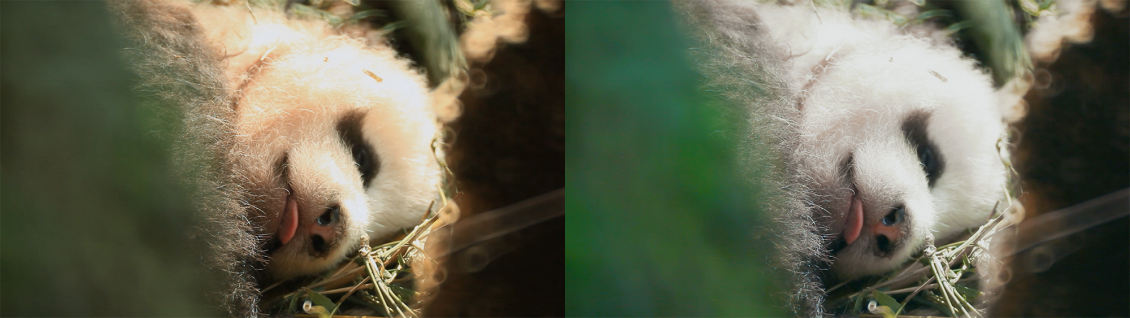
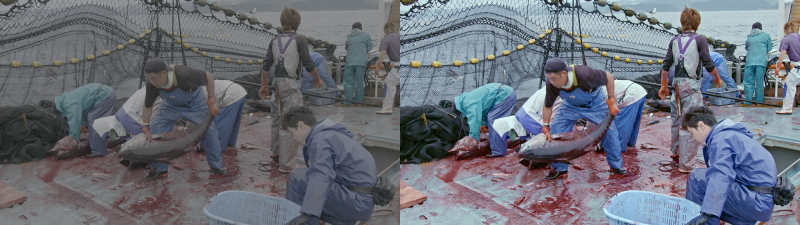
“Asimismo, las opciones de curvas en el programa son muy flexibles y pueden emplearse para hacer ajustes en una región específica de una imagen basándose en el matiz, la tonalidad o la saturación, sin afectar al resto del contenido. Por ejemplo, el director quería que la escena en la que se matan los peces en el puerto tuviese un aspecto frío, lo que combinado con un charco de sangre en el suelo, dio lugar a un estilo demasiado sangriento, de modo que utilicé la curva matiz vs. saturación con el objetivo de reducir la saturación del color rojo. De hecho, es muy fácil saturarlo en exceso, y de ahí que esta función me resultara muy útil para arreglar los excesos de saturación cromáticos, como por ejemplo en tomas con flores rojas o insectos en el césped”, ha añadido.
En una secuencia con pandas, el director de Climate Fightback percibió que el pelaje de estos animales salvajes tenía un tono amarillento después de la primera etapa de etalonaje, lo que hacía que el oso se viese muy sucio. Con el propósito de conseguir un aspecto limpio, el colorista redujo la saturación del pelo del animal con las curvas luminancia vs. saturación y matiz vs. saturación, junto con la herramienta de seguimiento Power Windows y las prestaciones para fotogramas clave. Respecto a la función de seguiento, agregó que “esta opción de Resolve es muy precisa, y es posible ajustar un gran número de parámetros. En definitiva, es muy flexible”.
A menudo, Lou empleó a la vez los controles para tonos intermedios y nitidez durante el etalonaje del documental. “Pude reducir los problemas de desenfoque al aumentar los valores en estos parámetros. Utilicé la misma técnica en los primeros planos de la escena en la meseta del Tíbet, a fin de iluminar la textura de la piel de los hombres del lugar”, ha afirmado el colorista.
En las producciones documentales, es posible que el equipo de grabación se encuentre con condiciones de iluminación incontrolables de vez en cuando, y de ahí que el colorista requiera procesar secuencias de baja luminosidad. “El ruido de la imagen puede ser muy notorio simplemente al incrementar el brillo y el contraste. Por consiguiente, usé las funciones de reducción de ruido temporal y espacial que ofrece DaVinci Resolve Studio, con el propósito de disminuirlo”, concluye Lou.
Did you like this article?
Subscribe to our NEWSLETTER and you won't miss anything.
Related articles
 The Mexican series 'Somos Oro' (Amazon Prime), graded with DaVinci Resolve Studio
 The competitor in Tribeca 'Sealed Off', graded with DaVinci Resolve
 The unusual film 'Something in the Dirt', graded with DaVinci Resolve
 The new version of the iconic series 'Heartbreak High', on Netflix, graded with DaVinci Resolve Studio
 ‘Leonor will never die’, released with DaVinci Resolve (Blackmagic)
 The 'Pagan Peak' series (Sky Deutschland) graded with DaVinci Resolve Studio
 ‘Red Alert’ (Netflix), graded with DaVinci Resolve Studio
 ‘The Green Knight’, etalonada con DaVinci Resolve Studio
 'Gaey Wa'r', graded with Blackmagic Design's DaVinci Resolve Studio
 Oscar-winning “Another Round,” graded with DaVinci Resolve
 La series 'Atlantic Crossing', de NRK, etalonada en DaVinci Resolve
 The second season of 'The End of the F***ing World', graded with Davinci Resolve
 The ‘Please Tell Me I’m Adopted!’ series, edited and graded with DaVinci Resolve Studio
 'Jack Ryan: Shadow Operation', graded with DaVinci Resolve