





Ask AId3n, el asistente de IA de Disguise, continúa su evolución gracias a Gemini 2.5
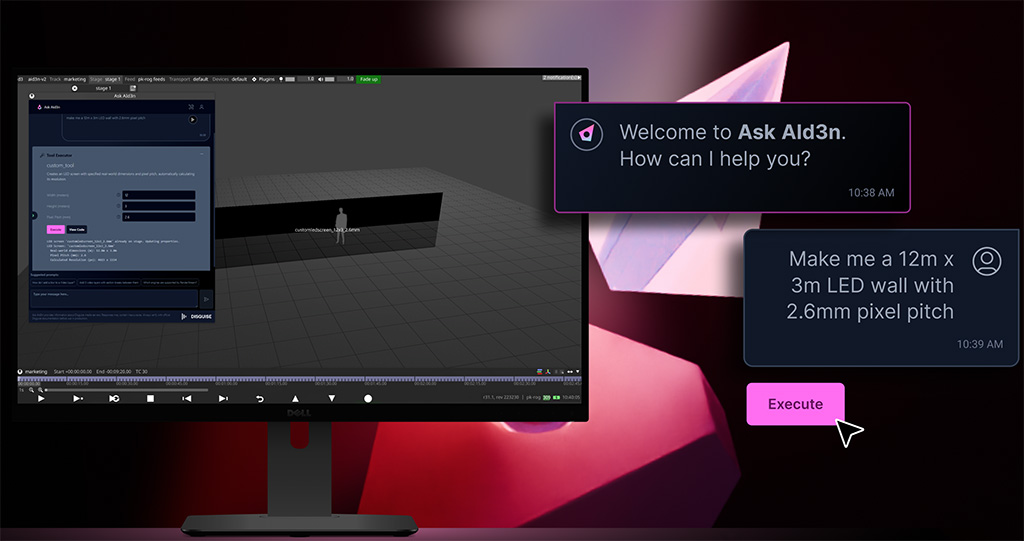
El asistente de flujo de trabajo de Designer Pro (Disguise), Ask Ald3n, recibe una nueva actualización potenciada por la tecnología generativa Gemini 2.5 Pro de Google que permite a los usuarios secuenciar tareas repetitivas o técnicas.
La última versión de Ask AId3n permite a los usuarios de Designer Pro escribir preguntas en una interfaz basada en chat: desde consultas sencillas como “¿Cómo añado desenfoque?” hasta comandos más complejos que indican a la herramienta que realice cambios directos en un archivo de proyecto. Por ejemplo, si se trabaja en las imágenes de un concierto en un estadio, los usuarios pueden indicar a Ask AId3n que configure la pantalla y el escenario para ese recinto en concreto, con detalles extraídos de la base de conocimientos de la IA para resolver el reto del tamaño y la resolución de la pantalla.
A continuación, podrían pedirle a Ask AId3n que cree capas y fotogramas clave para cada compás musical del espectáculo y que realice esos cambios en cuestión de segundos. Por otra parte, si se trata de una ceremonia de entrega de premios, los equipos podrían solicitar a Ask AId3n que de forma instantáneamente a capas de vídeo que presentaran al presentador, el premio y el ganador, con saltos de sección después de cada uno y repitiéndose para cada categoría de premios. Esta mejora busca liberar a los técnicos de tareas repetitivas y les proporciona una base sólida para secuenciar los medios.
Una vez que Ask AId3n recibe este tipo de comandos complejos, genera una herramienta personalizada basada en la solicitud. Lo único que tienen que hacer los usuarios es pulsar un botón para ver los resultados. Todas las herramientas generadas por Ask AId3n se almacenan en las cuentas de Disguise Cloud de los usuarios y son accesibles para cualquier persona de la misma organización de Disguise Cloud para su uso en proyectos futuros, lo que ahorra tiempo tanto en la configuración inicial como en futuras iteraciones.
Asimismo, si los resultados de Ask AId3n no son del todo correctos, los usuarios pueden revisar y editar el código Python que Ask AId3n ha generado para corregirlo manualmente. También puede dar a Ask AId3n la orden “corregirlo” para que revise este error.
Did you like this article?
Subscribe to our NEWSLETTER and you won't miss anything.
Related articles
 Amplify Seiri: An AI-powered all-in-one assistant that improves content management
 Wolftech develops News Scout, an assistant that aims to help journalists and editors produce better reports faster
 Hi human interface (Broadcast Solutions) continues its evolution with new integrations and power widgets at IBC 2023
 'The Hunt. Tramuntana' is the first Spanish series that has an audio game thanks to the voice assistant and 3D VR Binaural
 More than 470,000 users manage their Movistar+ content with the Aura digital assistant
 RED Gemini 5K S35: from space to NAB
 New Gemini 5K S35 sensor from RED Digital Cinema
 Telefónica launches Aura, its virtual assistant with artificial intelligence
 The BIT Broadcast 2014 workshops will take the pulse of an industry in the face of a future in continuous evolution
 The Gemini 4:4:4 recorder, by Convergent Design, at the Oscars
 Harmonic continues to grow thanks to new forms of broadcast
 Philips continúa en el mercado de televisores gracias a una joint venture con TPV
 ALCINE celebrates 41 years in continuous evolution
 New challenges in an industry in continuous evolution