





Blackmagic adds more than 300 new features to the new version 17 of DaVinci Resolve
Among them, it includes HDR grading, Magic Mask function with artificial intelligence, optimized editing and greater ease of use in the Fairlight module.
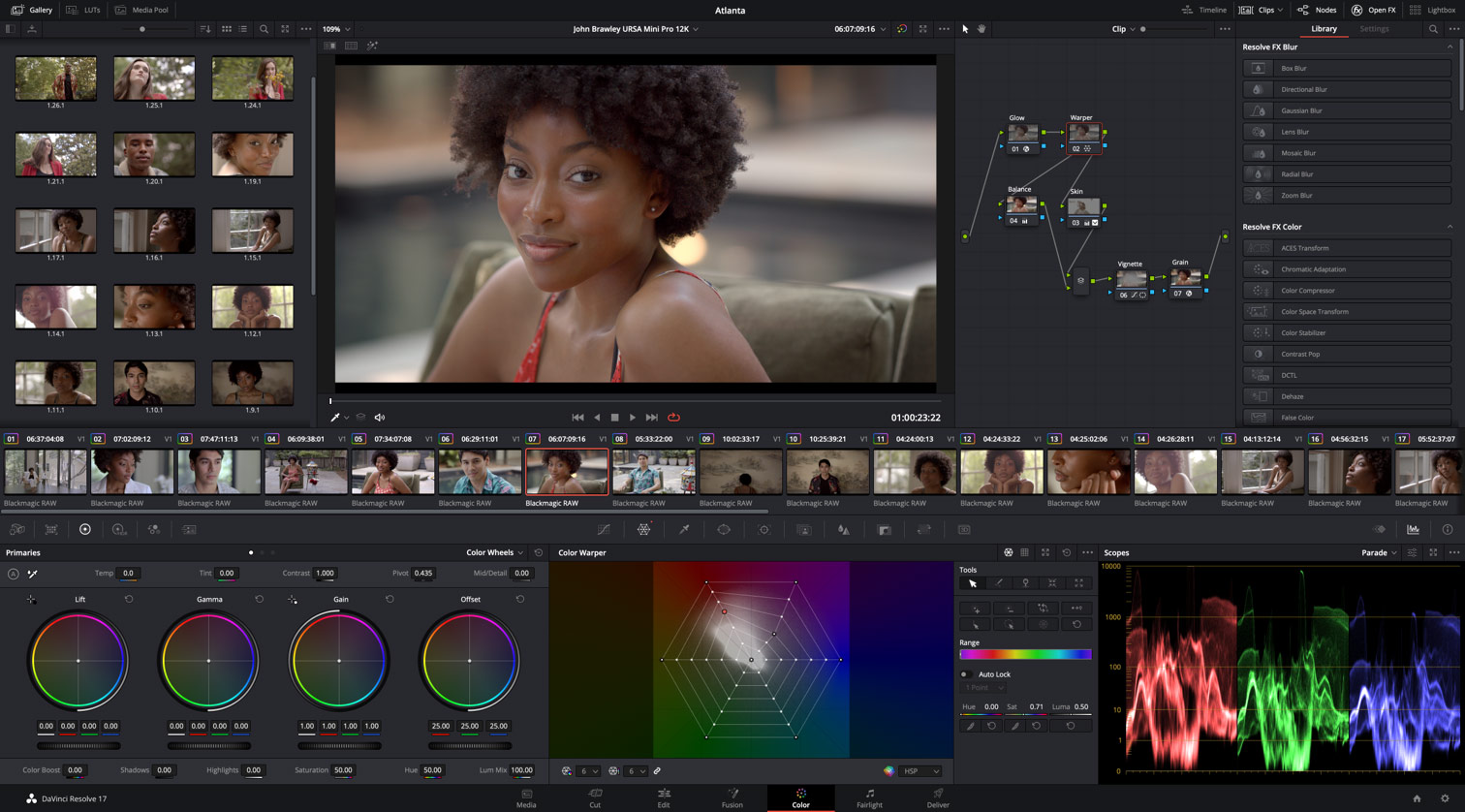
The thousands of users of DaVinci Resolve You are in luck because Blackmagic Design just launched the version 17 (still in beta) that includes more than 300 innovative features such as HDR grading, redesigned primary color controls, a next-generation Fairlight audio engine capable of processing 2,000 tracks in real time, and dozens of time-saving tools such as the new inspector, clip metadata visualization, and a revolutionary way to organize bins.
DaVinci Resolve 17 is a major update to the program with more than 100 new features and 200 improvements. He Color module It offers innovative features that make grading images with high dynamic range easier, as well as redesigned controls for primary corrections and a tool called Magic Mask that works through artificial intelligence.
For his part, the Fairlight module provides more ways to select different ways to edit with the keyboard and mouse, plus Fairlight Audio Core and FlexBus, two next-generation audio engines that can process more than 2,000 tracks. Additionally, a metadata clapperboard with bin dividers, extended waveforms for audio trimming, smart reframing, a unified inspector, and dozens of additional features that streamline workflows are included. In turn, compositions created in the Fusion module can now be used to create effects, titles or transitions in the Editing and Editing modules.
DaVinci Resolve 17 includes extraordinary creative tools for colorists. Furthermore, it has improved bullet layout and Power Window, while the Color module offers more options for split-screen dimming, a luminance vs. additional saturation, optimized graphical representations and support for 17-point three-dimensional conversion tables (LUT).
He nuevo panel HDR allows you to create color wheels with custom fades for specific tonal ranges, giving you greater creative control when making subtle adjustments. These circles include controls for exposure and saturation in each area, in addition to taking into account the color space, in order to achieve more uniform results.
La herramienta de distorsión cromática con retícula permite modificar dos parámetros simultáneamente, por ejemplo, el matiz y la saturación, o la crominancia y la luminancia. Los ajustes se realizan arrastrando puntos de control, brindando de este modo la posibilidad de conseguir una atenuación gradual para lograr una apariencia más nítida y natural. Es una manera completamente diferente de transformar el color en las tomas.
Nunca ha sido tan fácil seleccionar y rastrear personas para efectuar ajustes específicos. En tal sentido, la nueva función Magic Mask uses DaVinci's neural engine to automatically create masks for an individual's entire body or specific parts, such as the face or arms. Additionally, it includes tools that allow you to make subtle adjustments, add or remove strokes, or perform automatic tracking.
The new space DaVinci Wide Encountert and settings DaVinci Intermediate for intermediate tones they provide an internal and universal chromatic work area. This space covers more than what the cameras can capture and is larger than other options, such as BT.2020, ARRI or even ACES AP1. This way, you will never lose information, no matter where the images come from.
Fairlight module
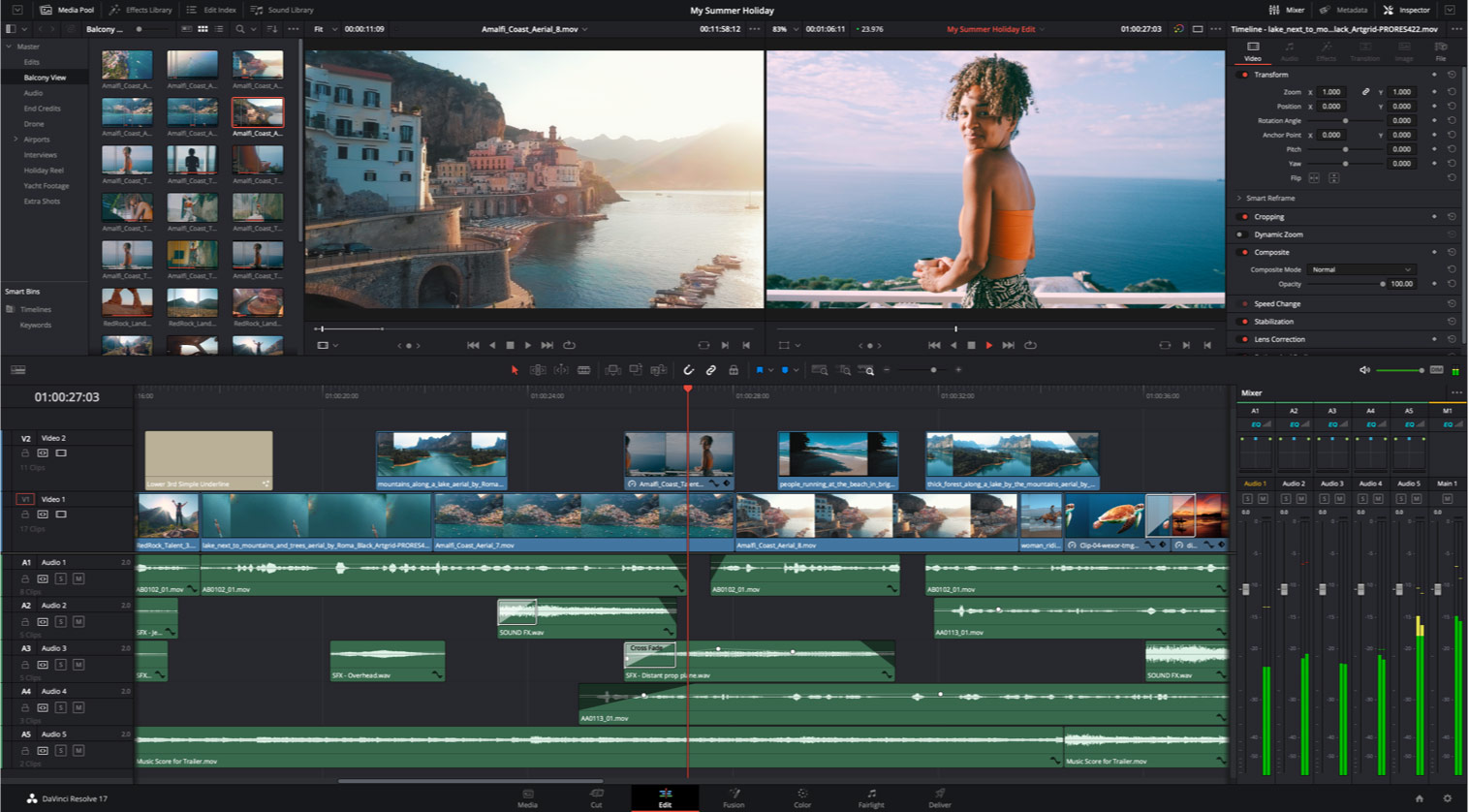
La actualización del módulo Fairlight en DaVinci Resolve 17 es una de las más importantes desde su creación e incluye mejoras, herramientas y prestaciones innovadoras para ofrecer una calidad sin igual durante la posproducción del audio.
El innovador modo de selección y las nuevas combinaciones de teclas permiten acceder a funciones que antes solo era posible realizar mediante el componente Fairlight Audio Editor y agilizan la edición en gran medida. Si ya has utilizado otras estaciones de audio digital, estas herramientas intuitivas y familiares te brindarán la oportunidad de comenzar a trabajar sin demora.
Fairlight Audio Core is a next-generation, low-latency engine that intelligently manages the workload by using all CPU cores and threads, as well as the optional Fairlight Audio Accelerator card. This allows you to manage a maximum of 2000 tracks with equalization, dynamics processors and 6 plugins for each of them in a single system.
The FlexBus architecture uses multifunction buses with up to 26 channels instead of fixed ones. In this way, it is possible to assign tracks to buses or vice versa, and even buses to other buses, with as many layers as necessary, to create highly complex mixes without any limitations.
The new tool transient analysis detecta automáticamente palabras, golpes o efectos sonoros y los indica mediante líneas verticales en la onda del audio. Es posible pasar de uno a otro utilizando las flechas en el teclado. Esto facilita la identificación de ciertas partes de un sonido para su posterior edición.
Fairlight Audio Core y FlexBus brindan la oportunidad de trabajar en proyectos complejos con miles de pistas en un mismo sistema. Anteriormente, esto requería la sincronización de varios equipos informáticos con un sistema primario. Además, las herramientas de colaboración entre usuarios de DaVinci Resolve permiten que varios editores trabajen simultáneamente en el mismo proyecto.
Módulo Montaje
El módulo Montaje en DaVinci Resolve 17 incluye funciones innovadoras que permiten finalizar proyectos con mayor rapidez.
The claqueta de metadatos con divisores de bandejas simplifica la búsqueda y organización de clips según la escena, toma o cámara, entre otras opciones. Al usar esta función en el modo de cinta, es posible alternar entre escenas o grupos de tomas con suma facilidad.
Por otra parte, se brinda la oportunidad de editar en HD 16:9 o UHD y crear rápidamente versiones con una relación de aspecto cuadrada o vertical para publicar las imágenes en Instagram y otras aplicaciones similares. El motor neuronal de DaVinci identifica rostros y los reubica automáticamente en el nuevo encuadre.
Now it's much easier to find the right effect, transition or title. The column view displays a greater amount of content and eliminates the need to scroll. In turn, descriptive icons allow you to quickly search for what you need, and you can move the mouse pointer over any object to see a preview in the viewer instantly.
Las live productions recorded with ATEM Mini Pro ISO mixers can be opened in the usual way for editing. In this sense, the synchronization tray allows you to make changes or even replace sockets. In addition, there is the option to use the material obtained through the switcher or relink the Blackmagic RAW files from the camera for UHD editing.
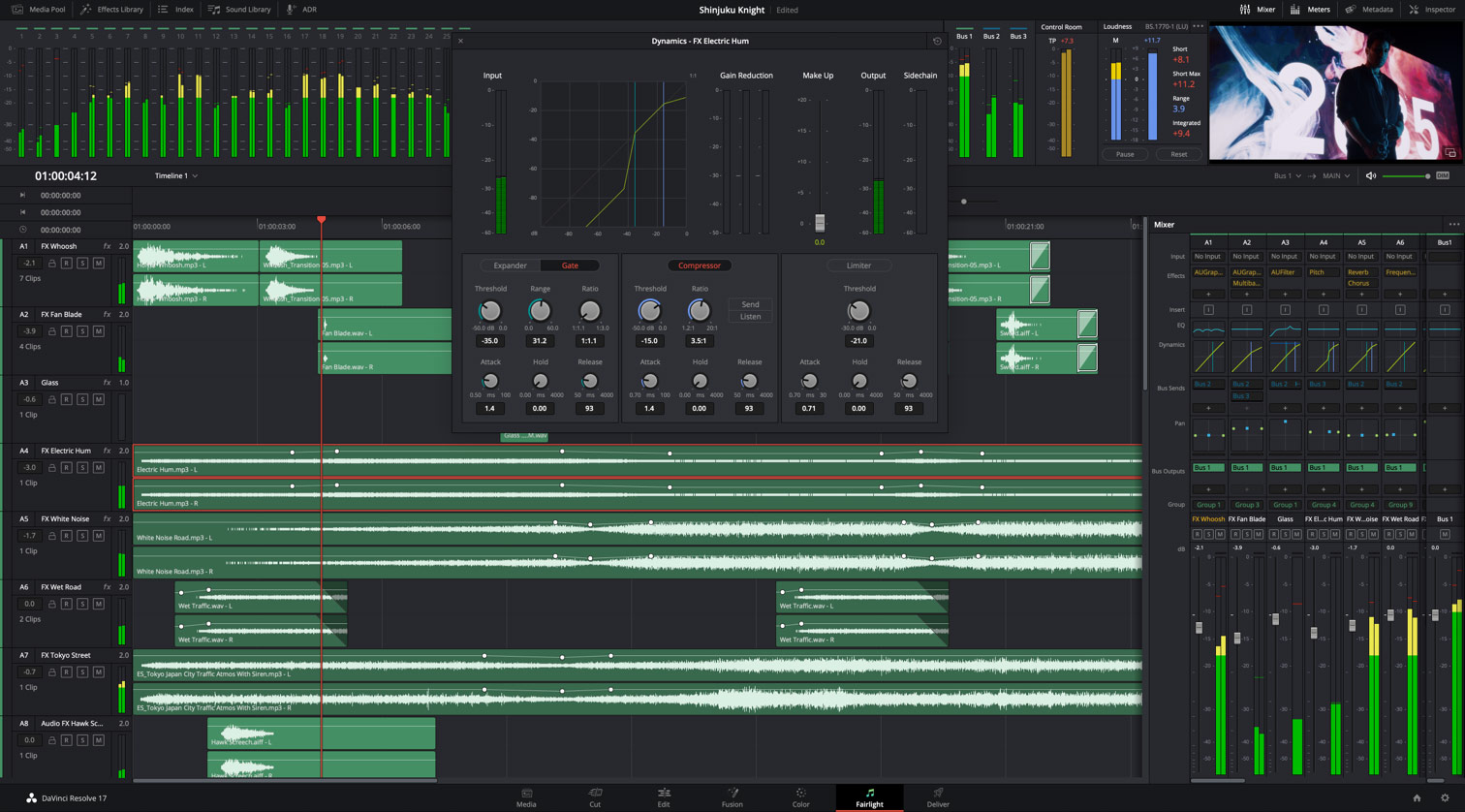
He Editing module includes dozens of innovative features requested by professional editors.
Ahora es posible crear archivos proxy independientes que se organizan con facilidad y no solo mejoran significativamente el rendimiento del sistema, sino también la portabilidad de los proyectos. La resolución de estos archivos puede llegar a ser 1/16 de la del material original, y se brinda la opción de guardarlos en formato H.264, H.265, ProRes o DNxHR. Incluso se ofrece la oportunidad de generarlos de manera interna o externa, a través de herramientas de terceros.
Ahora es más fácil crear clips multicámara sincronizados. Basta con apilarlos en la línea de tiempo y emplear la nueva herramienta de alineación automática para sincronizarlos según el código de tiempo o la onda del audio. Además, es posible mover los clips a una posición determinada para generar un mapa de sincronización. Cabe señalar que las líneas de tiempo pueden convertirse en un clip multicámara o compuesto.
Los nuevos complementos ResolveFX 3D, HSL y Luma Keyer permiten realizar composiciones directamente en la línea de tiempo de los módulos Edición y Montaje. Asimismo, se brinda compatibilidad con canales alfa de complementos ResolveFX y OpenFX u otros integrados, así como con máscaras externas, a fin de ofrecer una gama más amplia de opciones.
The renderización local permite renderizar cualquier parte de la línea de tiempo. Una vez finalizado el proceso, es posible mover, editar y recortar el material renderizado sin necesidad de volver a hacerlo. Estos archivos son fáciles de mover u organizar.
Por otra parte, es posible modificar un clip antes de editarlo en la línea de tiempo. Esto permite realizar cambios en los ajustes RAW, añadir una tabla de conversión (LUT), reasignar pistas de audio y redimensionar la imagen antes de proceder a editar el material.
Ahora es posible importar y exportar bandejas y líneas de tiempo individuales, lo cual facilita la colaboración entre distintos usuarios. Los archivos son tan pequeños que incluso pueden enviarse por correo electrónico.
The possibility of process timelines with interlaced images allows you to achieve higher quality when creating titles and compositions. DaVinci's Neural Engine analyzes movement between fields to reconstruct frames in progressive format. Additionally, the opportunity is provided to remove inserted frames when performing 3:2 conversions in real time.
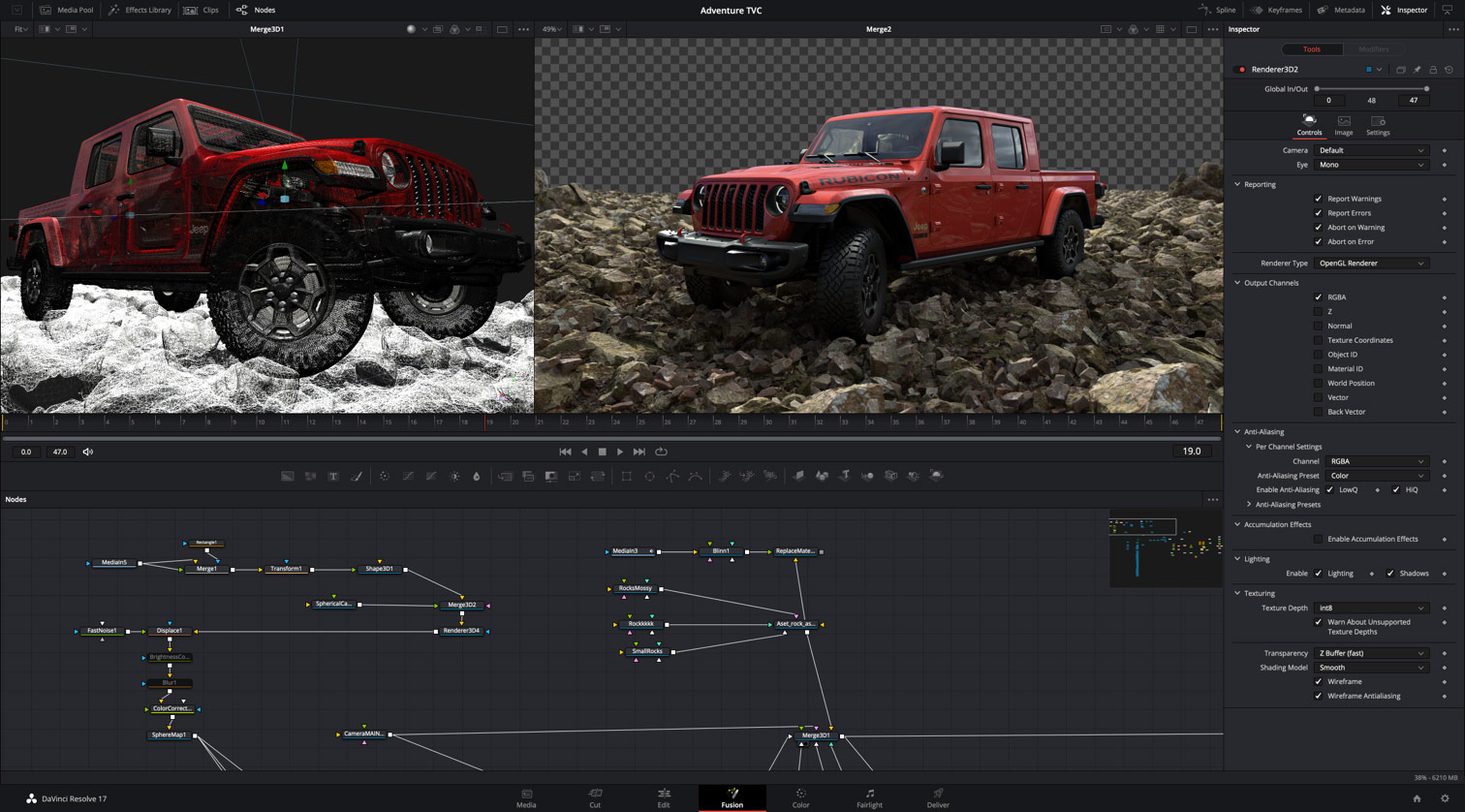
It is also possible to save compositions created in the Fusion module as templates to use in the Editing or Assembly module. New animation curve modifiers automatically resynchronize animations when changing their duration. In turn, the display of the waveform when playing the audio makes it easy to create precise animations, and it is possible to share markers with the Edit module.
Likewise, they have been added 27 ResolveFX Addons dynamic through the use of the GPU to the Fusion module, including noise reduction, as well as the sharpening tools used in the Color module. Markers in the node view, meanwhile, simplify navigation in complex compositions. Additionally, the ability to customize the toolbar and organize elements vertically in the node editor is provided.
Los nodal structure markers They allow you to quickly navigate complex compositions. In turn, customizable toolbars provide the opportunity to switch between them depending on the task performed, while, by organizing the nodal structure vertically, it is possible to view keyframe and parametric curve editors when creating animations.
New navigation
The Assembly module provides support for new formats in the Edit module, more delivery options, and a unified inspector in the Assembly, Editing, Media and Fairlight modules. Additionally, it offers consistent timeline navigation, optimized files and metadata, innovative resizing algorithms and smart filters, as well as bin sharing, and more GPU- and CPU-powered ResolveFX plugins.
Now everyone can create their own post production company. In this sense, the free version of the program includes collaboration tools that were previously only available in DaVinci Resolve Studio. In this way, several users can work simultaneously on the same project.
DaVinci Resolve 17 allows you to start edit files while they are being recorded. En tal sentido, brinda la posibilidad de decodificar clips en formato QuickTime PNG, RGB de 8 bits sin compresión, YUV AVI de 10 bits y Panasonic 8K SHV.
Por otra parte, el programa ofrece compatibilidad con metadatos de archivos de cámaras Blackmagic (RAW), ARRI, RED y Sony, permitiendo además decodificar y renderizar metadatos EXR de fotogramas individuales.
In addition to the use of languages such as Python and Lua, DaVinci Resolve 17 provides new application programming interfaces (API) that allow you to integrate work dynamics and decode content. These give other developers the ability to combine resource management solutions with program capabilities and code plugins to add custom delivery options.
Grant Petty, CEO of Blackmagic Design, emphasizes that "this important update offers cutting-edge technology for specialists in color, audio, editing and visual effects. Although the new colorimetry, HDR grading and the greater ease of use of the Fairlight module are the highlights of this version, I am very proud of the thousands of small improvements that users will notice when using the program every day."
Main features
- High dynamic range grading with customizable tonal circles and zones.
- Chromatic distortion with a grid that offers an innovative way to transform color.
- Magic Mask function activated by DaVinci's neural engine that allows you to automatically isolate objects.
- Improved color management with tools that vary based on color space and tonal mapping.
- Large color spectrum to process images with better quality.
- Streamlined audio editing with new contextual tools when using the keyboard and mouse.
- Fairlight Audio Core engine with automatic workload compensation and the ability to process 2000 tracks.
- Revolutionary FlexBus architecture to distribute audio without limitations.
- Automatic transient detection for beats, words and sound effects.
- Capable of complex audio projects with thousands of tracks in a single system.
- Visualización de metadatos en el panel multimedia o el módulo Montaje.
- Recorte de audio con precisión en la herramienta gráfica y la línea de tiempo del módulo Montaje.
- Reencuadre inteligente mediante el motor neuronal de DaVinci en los módulos Edición y Montaje.
- Vista previa de efectos, títulos y transiciones en los módulos Edición y Montaje.
- Posibilidad de importar y editar archivos de proyectos generados en mezcladores ATEM Mini Pro ISO.
- Dinámicas de trabajo con archivos proxy a 1/16 de la resolución original en formato H.264, H.265, ProRes o DNxHR.
- Sincronización a partir de la línea de tiempo para crear clips compuestos y multicámara.
- Compatibilidad con canales alfa para crear máscaras y composiciones en los módulos Edición y Montaje.
- Renderización local para clips con gran cantidad de efectos en los módulos Edición y Montaje.
- Posibilidad de modificar clips antes de editarlos en la línea de tiempo.
- Mayor facilidad al compartir bandejas y líneas de tiempo.
- Procesamiento entrelazado y eliminación de fotogramas insertados al realizar conversiones 3:2.
- Marcadores en la estructura nodal, barra de herramientas personalizable en el módulo Fusion y organización vertical de nodos.
- Compatibilidad con archivos expansibles en el panel multimedia.
- Compatibilidad con metadatos de fotogramas en formatos Blackmagic RAW, ARRI, RED, Sony y EXR.
- API interfaces to integrate work dynamics and encode third-party content.
Did you like this article?
Subscribe to our NEWSLETTER and you won't miss anything.
Related articles
 DaVinci Resolve Studio grades, mixes audio and creates the final version of 'Adam Bol'
 Blackmagic updates DaVinci Resolve to version 19.1: more effects in Fusion, custom curves...
 The new version of the iconic series 'Heartbreak High', on Netflix, graded with DaVinci Resolve Studio
 Blackmagic boosts Mac support and RAW processing in DaVinci Resolve version 17.4
Blackmagic Boosts Mac Support and RAW Processing in DaVinci Resolve Version 17.4
Blackmagic boosts Mac support and RAW processing in DaVinci Resolve version 17.4
Blackmagic Boosts Mac Support and RAW Processing in DaVinci Resolve Version 17.4
 Blackmagic Design updates DaVinci Resolve to version 17.3
Blackmagic Design updates DaVinci Resolve to version 17.3
Blackmagic Design updates DaVinci Resolve to version 17.3
 Blackmagic Design updates DaVinci Resolve with new Fairlight tools
 Blackmagic Design accelerates editing, grading and effects creation with the new version of DaVinci Resolve
 Blackmagic Design introduces more than thirty new functions in DaVinci Resolve 15.2
 Oscar winner Claudio Miranda trusts DaVinci Resolve Studio and DaVinci Resolve Mini Panel from Blackmagic
 Blackmagic surprises with the launch of a new camera and innovative control panels for DaVinci Resolve
 DaVinci Resolve 11 Beta Now Available
 Blackmagic updates DaVinci Resolve to support new Retina displays