





Así es DaVinci Resolve 19: 100 mejoras, IA, sonido envolvente…
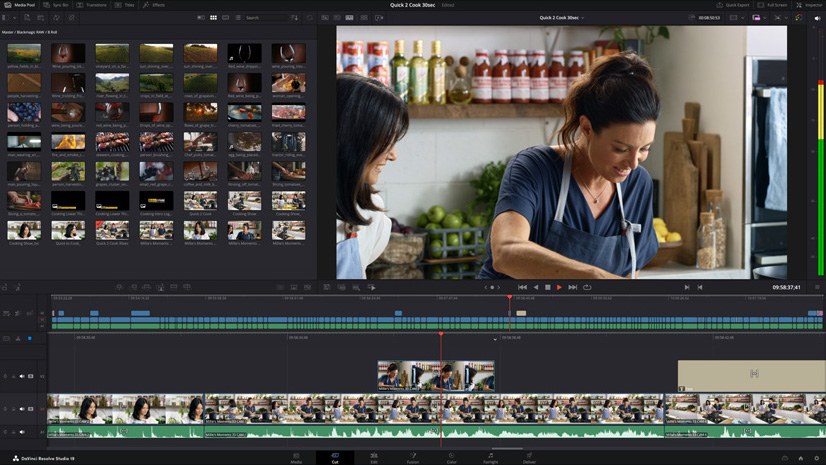
Blackmagic Design sigue mejorando su herramienta de postproducción, DaVinci Resolve 19, para optimizar sus prestaciones de etalonaje y ampliar su propósito a todas las fases de la postproducción: edición, sonido, efectos especiales…
DaVinci Resolve 19 incluye como principales novedades un nuevo motor neuronal basado en artificial intelligence y más de 100 prestaciones actualizadas. En el módulo Edición, destacan las nuevas mejoras en cuestión de transcripción, las cuales ofrecen la oportunidad de editar clips según el texto transcrito directamente en la línea de tiempo. Ahora, el analizador también brinda la posibilidad de detectar múltiples voces, lo que permite asignar nombres a distintos hablantes y refinar la búsqueda y el reemplazo de texto.
Dentro del módulo de Montaje, los operadores podrán seleccionar las imágenes captadas por las cámaras en directo, en tiempo real, a fin de realizar repeticiones de inmediato con efectos de cámara lenta y transiciones animadas. Esta nueva función permite ver las señales de las cámaras en directo o incluso clips con un código de tiempo en común en una pantalla de visualización simultánea: es posible desplazarse por las imágenes, reproducir y seleccionar tomas para añadirlas a la línea de tiempo o simplemente emitirlas al aire, e incluso alternar entre distintos ángulos en directo.
Adicionalmente, al mirar las señales de cámaras en directo o una visualización simultánea de clips, los operadores tendrán la oportunidad de señalar un evento significativo con un marcador de punto de interés (o «PDI»). Este se agrega en todos los clips al mismo tiempo, de modo que se puede buscar dicho evento con suma rapidez en cada ángulo de la cámara, reproducirlo al aire o incluso crear una línea de tiempo con momentos destacados relacionados.
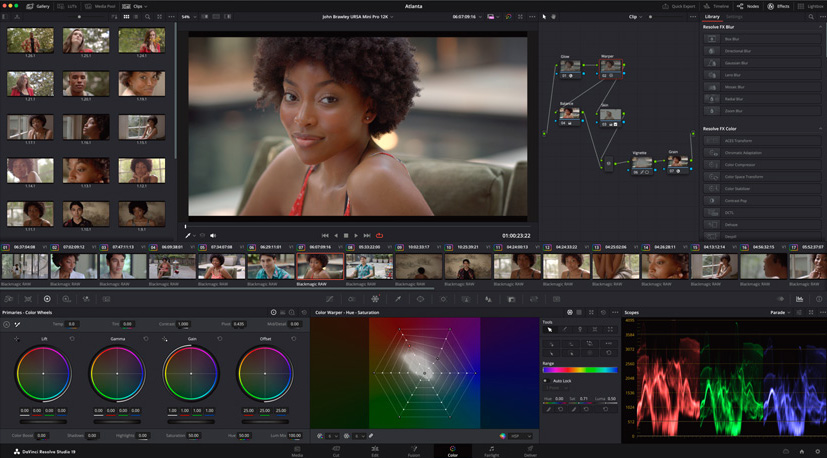
Mejoras en el tratamiento de color y VFX
DaVinci Resolve 19 estrena UltraNR, un nuevo modo de reducción de ruido dinamizado por su motor neuronal en el panel correspondiente del módulo Color que puede ser usado para disminuir drásticamente el ruido digital de un fotograma mientras que se conserva la claridad de imagen. Alternativamente, se puede combinar con la reducción de ruido temporal con el propósito de lograr un efecto mayor en imágenes en movimiento. Otra novedad es el nuevo creador de estéticas cinematográficas, que permite generar estilos que simulan características de las cintas, tales como halos, resplandores, granulosidad, parpadeos y viñetados. Su funcionamiento es sencillo: basta con ajustar los pasos de la exposición y emplear los controles de saturación sustractiva, intensidad y tonos divididos para lograr aquellas apriencias que se suelen encontrar en la gran pantalla.
Blackmagic también presenta el nuevo panel ColorSlice de etalonaje de seis vectores, que utiliza procesos cromáticos sustractivos para ajustar la densidad, la saturación y el matiz de la imagen. Los parámetros de cada área personalizable brindan la posibilidad de mejorar y potenciar el color de manera que luzca “agradable y natural”.
Dentro del módulo Fusion, la función VolumenU hace posible importar archivos VDB volumétricos directamente en Fusion, lo que evita conversiones poco eficientes. Asimismo, ofrece un control creativo sobre efectos importados, tales como humo, fuego, nubes y explosiones, brindando control sobre la densidad, temperatura y el color del archivo VDB en DaVinci. Esta nueva prestación muestra todas las máscaras en una sola lista, lo que evita tener que alternar entre nodos a fin de lograr técnicas rotoscópicas más precisas y ágiles.
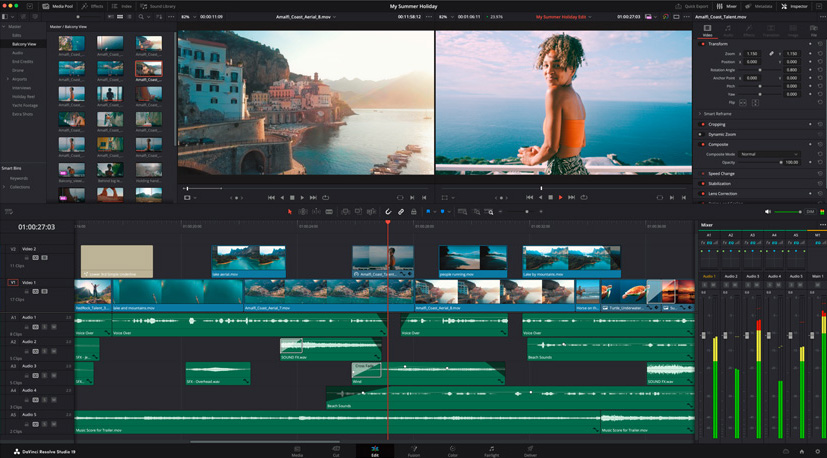
Un nuevo enfoque para el audio
DaVinci Resolve 19 trae importantes mejoras en materia de audio, como el seguimiento mediante la función IntelliTrack dentro del módulo Fairlight para generar una distribución del audio precisa al rastrear personas u objetos a medida que se desplazan por espacios 2D y 3D. Este sistema brinda la posibilidad de distribuir la voz de distintos actores en una escena controlando su posición en el entorno de mezcla, y se complementa con un efecto de separación de diálogos basado en inteligencia artificial, que permite ajustar el diálogo según el sonido ambiente y la reverberación de la sala, además de controles de voz, fondo y ambiente con los que es posible reducir, volver a mezclar o eliminar sonidos contrapuestos.
Otra novedad de calado es el nuevo efecto de atenuación automática, que permite que una pista ajuste automáticamente el volumen de otra sin la necesidad de establecer una compresión compleja de cadena lateral o curvas de automatización. Esta característica permite reducir la música o el ruido de fondo cuando se detecta la presencia de diálogo y luego ajustar la mezcla de audio con los controles avanzados, así como ofrece controles para silenciar y ajustar voces, baterías, bajos, guitarras y otros instrumentos.
Finalmente, el módulo Fairlight ahora puede controlar el sonido envolvente Ambisonic, formato esférico que permite grabar, mezclar, controlar y entregar este tipo de pistas de audio. De esta forma, DaVinci Resolve 19 ofrece una operación nativa completamente integrada con buses y pistas del primer al quinto orden, procesamiento de efectos nativos, distribución esférica 2D y 3D, monitorización biaural y basada en canales, medición dinámica en el visor y compatibilidad con el seguimiento de cabezas.
Did you like this article?
Subscribe to our NEWSLETTER and you won't miss anything.
Related articles
 DaVinci Resolve Studio, clave para el montaje, etalonaje y mezcla de sonido de ‘Winny’
 DaVinci Resolve llega a los iPad Pro con chips M1 y M2
 ‘Leonor will never die’, released with DaVinci Resolve (Blackmagic)
 El sonido de ‘Magnificent Madness’, postproducido con DaVinci Resolve (Blackmagic Design)
 DaVinci Resolve 17.1, compatible con procesadores M1 en equipos Mac
 VRT opta por DaVinci Resolve para postproducción
 El oscarizado Claudio Miranda confía en DaVinci Resolve Studio y DaVinci Resolve Mini Panel de Blackmagic
 DaVinci Resolve 12.1, con renderización remota, ya disponible
 DaVinci Resolve estrena más de 70 mejoras
 DaVinci Resolve 10, disponible ya en beta
 Dolby Atmos: la nueva generación de sonido envolvente
 'The Sound of the Oceans', the first documentary series with underwater surround sound
 DTS llevará a IBC el mejor sonido envolvente para entornos IPTV
 Blackmagic desvela el nuevo DaVinci Resolve 8