





The real 'Yellowstone' takes shape with DaVinci Resolve as an editing and grading platform
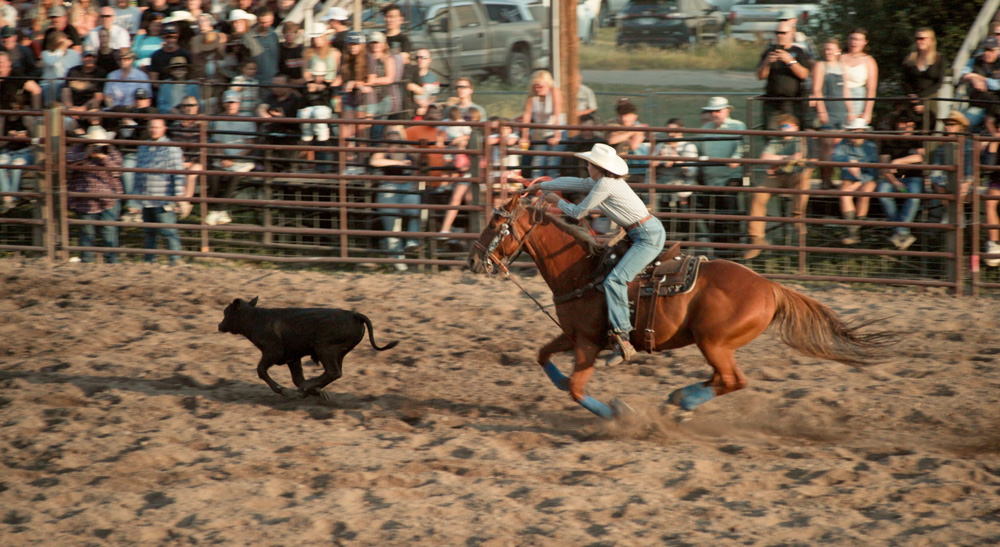
El editor Olivier Peters y el etalonador Matt Hartle apuestan por DaVinci Resolve (Blackmagic) para la postproducción de ‘The Real Yellowstone’, el último documental del premiado director y defensor de los derechos humanos Tom Opre.
The Real Yellowstone se adentra en la vida de familias ganaderas que se encuentran en medio de un conflicto complejo: el aumento del precio de la tierra, los ataques de depredadores y un poderoso movimiento conservacionista que pretende transformar el paisaje que consideran su hogar. “Es una mirada honesta a la vida actual en el oeste estadounidense, muy distinta de cómo suele mostrarse en la ficción televisiva. Como documental, intentamos dar voz a todas las partes, plantear observaciones y generar conciencia sobre ideas que a veces cuestionan conceptos muy arraigados”, comenta Peters.
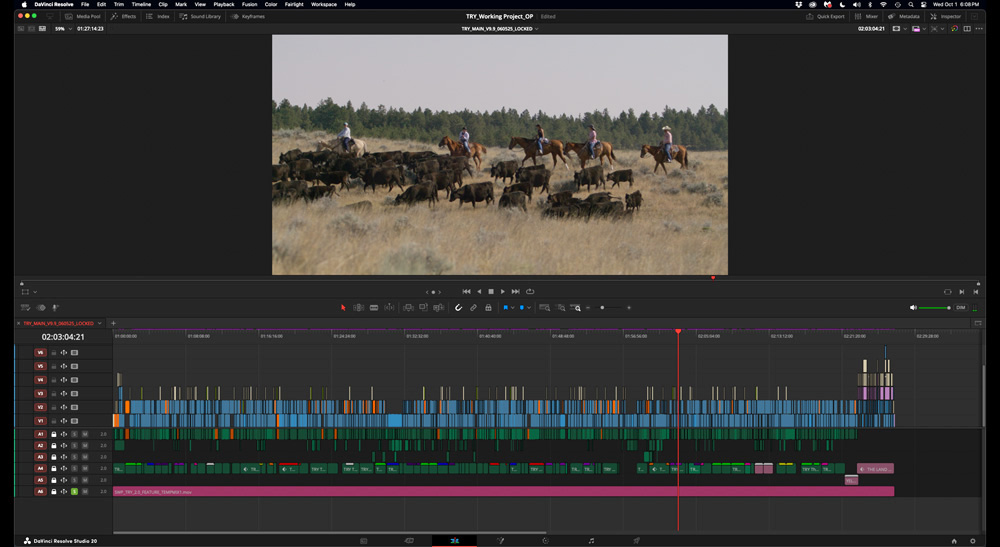
La producción tuvo una duración de dos años e incluyó una enorme variedad de material: eventos, entrevistas y tomas de apoyo grabadas de múltiples maneras (desde cámaras profesionales hasta teléfonos inteligentes y drones), además de material de archivo, fotografías y animaciones: “Para simplificar, trabajé en una línea de tiempo DCI 4K, con todos los duplicados de menor resolución en el mismo tamaño y frecuencia de imagen que los originales. Así, evitamos tener que hacer conversiones o algún truco de revinculación al entregar el proyecto al colorista”.
El documental es el primer trabajo en el que el colorista utiliza DaVinci Resolve Studio tanto para la edición en baja resolución como en la versión definitiva al completo. El montaje implicó principalmente cortes, disolvencias, redimensionamiento de clips (con material grabado en 6K) y seguimiento de objetos, si bien Peters también creó todos los títulos de apertura, rótulos y créditos finales con las herramientas de texto de DaVinci Resolve Studio.
Del mismo modo, se encargó de editar y distribuir toda la música para crear una mezcla previa temporal, utilizando el módulo Fairlight del programa a fin de llevar a cabo tareas básicas de ecualización y compresión: “Compuse la banda sonora a partir de material original proporcionado por el compositor Paul Mounsey. Lo mejor es modificar el volumen de cada clip en el módulo Edición y luego ir al módulo Fairlight para ajustar cada pista; por ejemplo, aplicando un mismo ajuste de ecualización y compresión a todos los diálogos. Lo mismo con la música”.
Definiendo el color de The Real Yellowstone
Una vez cerrada la edición, el colorista Matt Hartle, of Baked Studios, etalonó el material de alta resolución en DaVinci Resolve Studio. Posteriormente, el técnico Rob Dewbre generó la película final en varias secciones DCI 4K sin textos, nuevamente en Resolve. En palabras de Peters: “Me enviaron los archivos junto con las pistas de audio finalizadas. En el módulo Color del programa, realicé un seguimiento de algunos rostros y los difuminé como toque final. A partir de esos elementos, armé las versiones definitivas del documental”, indicó Peters.
“Como trabajamos de principio a fin en DaVinci Resolve Studio, el intercambio de información entre los procesos de edición y etalonaje fue más sencillo que casi en cualquier otra dinámica de trabajo con material en alta y baja resolución. No hizo falta usar archivos XML, EDL ni nada parecido, y las decisiones creativas, como los movimientos al estilo Ken Burns en las fotos, se convirtieron correctamente. Sinceramente, al principio, aunque confiaba en la capacidad básica de Resolve, dudaba de que pudiera manejar el montaje de un largometraje con tantísimos archivos provenientes de fuentes muy diversas. Al final fue una experiencia sorprendentemente fluida y exitosa”, explica.
La experiencia no ha podido ser más satisfactoria para el editor: “A primera vista, el programa puede intimidar a los editores novatos, pero en realidad es muy fácil de usar. Para cualquier editor, sin importar su nivel, Resolve ofrece una dinámica de trabajo integral que es difícil de superar”.
Did you like this article?
Subscribe to our NEWSLETTER and you won't miss anything.
Related articles
 Color (Grup Mediapro) consolidates DaVinci Resolve as an editing and grading solution
 RTS television migrates its grading processes to DaVinci Resolve
 DaVinci Resolve consolidates itself as the editing software of the global news agency AP
 ‘Extremely Inappropriate!’, the TBS drama series, uses DaVinci Resolve Studio in its grading
 Blood Incantation consolidates itself as a revelation band with 'The Stargate', video edited in DaVinci Resolve
 'That Was Us' podcast from the iconic 'This Is Us' series takes shape with Blackmagic solutions
 DaVinci Resolve Studio, key to editing, grading and sound mixing of 'Winny'
 DaVinci Resolve, chosen for grading of 'Reality' (HBO Max)
 Pigment switches to DaVinci Resolve for HDR and IMF grading
 Blackmagic Design accelerates editing, grading and effects creation with the new version of DaVinci Resolve
 Blackmagic Design challenges the traditional way of working with DaVinci Resolve 16
 Oscar winner Claudio Miranda trusts DaVinci Resolve Studio and DaVinci Resolve Mini Panel from Blackmagic
 DaVinci Resolve Studio processed the copies and final grading of 'Murder on the Orient Express'
 Blackmagic launches DaVinci Resolve 12 with unprecedented collaborative editing and grading options