





Blackmagic adds ProRes 422 (HQ) for recording and playback on HyperDeck Shuttle 2
The 3.6 software update for your HyperDeck solid-state drive (SSD) will support Apple ProRes 422 (HQ) on HyperDeck Shuttle 2, and closed caption for all HyperDeck models.
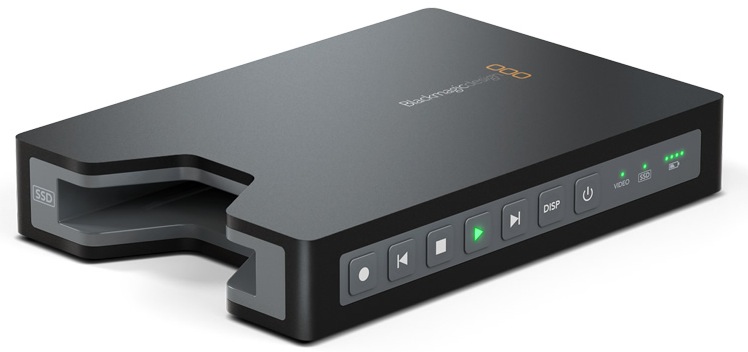
Blackmagic Design has released software update 3.6 for its HyperDeck solid state drive (SSD), the main novelty of which is support for Apple ProRes 422 (HQ) in HyperDeck Shuttle 2, and closed caption for all HyperDeck models.
This new ProRes compression will significantly reduce the size of uncompressed high-definition video files, preserving full frames in 10-bit 4:2:2 quality, allowing users to record up to six times longer.
Grant Petty, CEO of Blackmagic Design, highlighted that this step means "giving users the freedom to work in either compressed or uncompressed formats. Recording ProRes 422 (HQ) directly to disk will now cost less per minute of recording to professional tape, plus it is the workflow even more efficient. A 64 GB SSD that costs less than $70 will record 50 minutes of the highest quality ProRes video. That means recording to the highest quality for less than 2 dollars per minute.” l
ProRes 422 (HQ) offers very high quality for 4:2:2 with minimal generation loss, and together with fast export, has made it one of the most popular video formats. HyperDeck Shuttle allows you to work with all types of cameras as it allows the recording of video files from SDI and HDMI signals directly at 10-bit uncompressed in QuickTime, Avid DNxHD MXF and now Apple ProRes 422 (HQ). SSDs are cheap and fast, and can be connected to an eSATA dock for instant access to media files, thus offering maximum flexibility.
The new update also includes full subtitle support for all HyperDeck models in the different 1080HD video formats and allows closed caption data to be read from the SDI input when recording and saved in .mcc files, which are compatible with the popular MacCaption editing software. When playing from HyperDeck, the .mcc files are read and the closed caption data is inserted into the SDI output.
Did you like this article?
Subscribe to our NEWSLETTER and you won't miss anything.
Related articles
 Countdown to version 2.0 of the Sony Burano, which adds more recording modes or SDI support
 AR studio Framefloor chooses AJA for monitoring, recording and playback functions
 Grass Valley to bring UHD digital recording and playback to venues and stadiums with T3
 PBS shoots and grades ‘When We Were Shuttle’ with solutions from Blackmagic Design
 The new Lumix GH6 incorporates a 25 MP sensor, 5.7K video at 60p and internal Apple ProRes recording
 Baton (Interra Systems) prepares for 8K playback with solutions from Blackmagic Design
 Shogun 7 update enables recording of up to 4Kp60 ProRes RAW full frame on the Sony FX6
 Blackmagic Design updates the operating system of its HyperDeck Studio recorders to incorporate new functions
 Blackmagic launches joint offering for ATEM Production Studio 4K and HyperDeck Studio 12G
 Blackmagic Design Adds New ProRes Formats to HyperDeck Studio
 Japan's Traffic Slim launches the Torube Lite recording/playback unit
Grass Valley redefines recording, storage and playback with improvements to the T2 iDDR
Japan's Traffic Slim launches the Torube Lite recording/playback unit
Grass Valley redefines recording, storage and playback with improvements to the T2 iDDR
 Cinedeck RX: recording, monitoring and playback anywhere
Vsn adds native support for ProRes 422 to its video servers
Cinedeck RX: recording, monitoring and playback anywhere
Vsn adds native support for ProRes 422 to its video servers